Home | Contact Us | Submit Troubleshooting Info | Search | Help
Output | Software Solutions | Proofing | Color, Screening and Calibration | Scanning | Digital Photography | Consumables | POS
Home | Contact Us | Submit Troubleshooting Info | Search | Help
Output | Software Solutions | Proofing | Color, Screening and Calibration | Scanning | Digital Photography | Consumables | POS
Product |
All versions of Prinergy® Evo |
||
Operating system |
Windows® XP with SP2/Windows 2003 Server |
||
Error |
Preps or the TrapEditor plug-in in Acrobat or both programs cannot acquire a floating license from Prinergy Evo. |
||
Cause |
Windows XP with Service Pack 2 automatically adds new security settings for the Windows firewall. These new security settings may prevent Preps and the TrapEditor plug-in that's available in Acrobat to locate the licenses on the Prinergy Evo server. |
||
Solution |
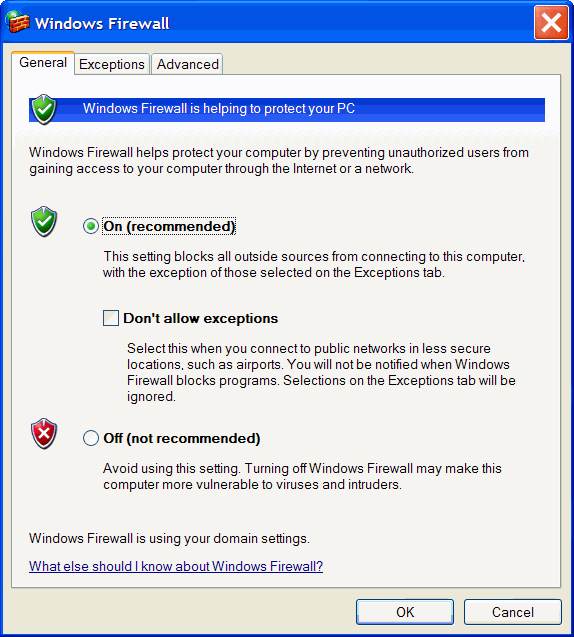
The Windows firewall can be configured so that Preps and the TrapEditor plug-in can locate the licenses on the Prinergy Evo server. To configure the firewall:1. Go to Start > Settings > Control Panel > Windows Firewall. 2. On the General tab, ensure that On is selected and that the Don’t allow exceptions check box is cleared.
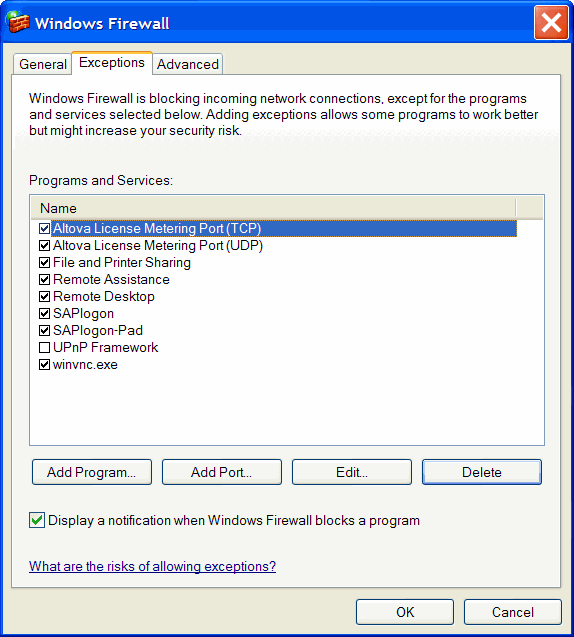
3. On the Exceptions tab, you need to add Preps and Acrobat to the list. Click Add Program.
4. From the Program Files\Creo\Preps5.1\Preps folder, select Preps51.exe. 5. From the Program Files\Adobe\Acrobat (version)\Acrobat folder, select Acrobat.exe and click OK. 6. Before exiting the Windows Firewall dialog box, confirm that Preps51.exe and Acrobat.exe appear in the Exceptions tab and that the check boxes are selected. 7. Click OK. | ||
Technical contact(s) |
|||
Date submitted |
11 Mar 2005 |
||