Home | Contact Us | Submit Troubleshooting Info | Search | Help
Output | Software Solutions | Proofing | Color, Screening and Calibration | Scanning | Digital Photography | Consumables | POS
Home | Contact Us | Submit Troubleshooting Info | Search | Help
Output | Software Solutions | Proofing | Color, Screening and Calibration | Scanning | Digital Photography | Consumables | POS
FCO 21563
|
| Prepared By: | A. Posner | FCO Kit No.: | 510F21563 |
| Comp. Level: | N/A | Machine S/N: | N/A |
| Catalog No. | 507A42092 | S/W Affected: | N/A |
| Type of Change: | Conditional | ||
| Product Mgr: | K. Paperny | Approval Date: | 20/12/95 |
| Product Support: | S. Amit | Approval Date: | 17/12/95 |
| Service Mgr: | S. Cohen | Approval Date: | 20/12/95 |
3.1 Bar (head) Punch system
- Power off the image setter.
- Disassemble the Punch M board and the special punch s board.
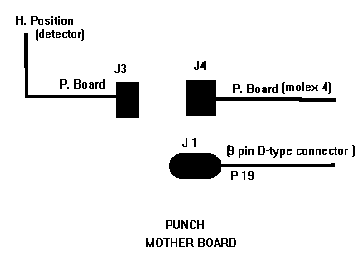
- Remove the small cable from the supplied Master Board. (The cable is marked: Remove cable for bar Punch.
- Install the supplied Master board.
- Connect the molex 4 connector to the board, connect the home position to the bar punch home position and the punch harness to the D-type connector.
- Power on the imagesetter.
- Check and reconfigure the punch system.
3.2 Side Punch system or side and Bar Punch System.
- Power off the imagesetter.
- If bar Punch installed follow the instructions of bar punch system above. If not, do not remove the cable from the Master board.
- Perform FCO 21716 on all the Punch slave boards
STA can order up to 10 kits STE can order up to 9 kits STMA can order up to 3 kits STN can order up to 2 kits