Home | Contact Us | Submit Troubleshooting Info | Search | Help


    Output | Software Solutions | Proofing | Color, Screening and Calibration | Scanning | Digital Photography | Consumables | POS


Dolev 800/800V/800VČ - Brisque Application Issues
Loading the Supply Cassettes

Overview
Bringing the Cassette to the Darkroom
Mounting Media on the Supply Cassette
Mounting the Supply Cassette on the Imagesetter

Overview

The three Dolev 800 supply cassettes are used with medium to high contrast red sensitive lith or line film, paper, or polyester plates.

The three steps to load new exposure media are:

  1. Bring the cassette to the darkroom.
  2. Mount the media on the cassette.
  3. Load the supply cassette on the imagesetter.

Bringing the Cassette to the Darkroom

  1. Open the supply cassette compartment door. To remove the small (12 in) or medium (20 in) size cassette, push back the locking bar.
  2. Remove your cassette. Carry the supply cassette to the darkroom.
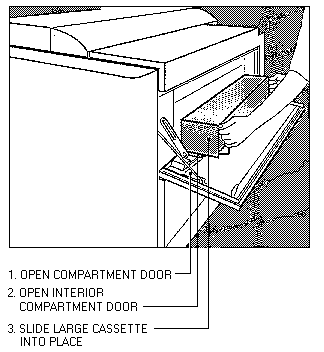
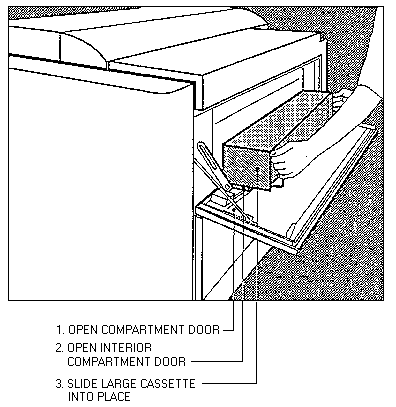
  3. The large cassette has a separate compartment door. It is located on the front on the imagesetter. Open the door. Inside is another compartment door. The compartment houses the large (33 in) cassette. Open the door.

    Opening Large Cassette Compartment

    oplarge.gif (5658 bytes)
  4. Remove the cassette. Carry the cassette to the darkroom.

Mounting Media on the Supply Cassette

  1. Check that the film you plan to load on the cassette is in the darkroom before you lock the door and turn off the lights.

    Caution: All Dolev imagesetters require a bright cyan light source for film development. Do not use red or yellow illumination!

  2. Close and lock the door to the developing room.

  3. Light the bright cyan light.

  4. Open the supply cassette. Two latches secure the cassette lid. To open the supply cassette, push the latches horizontally toward the center of the cassette. Pull up on the lid until it is in a resting position.

    Opening the Supply Cassette

    opsupc.gif (6812 bytes)
  5. Grasp the outer surface of both mounting rims and lift the film spool out of the cassette.

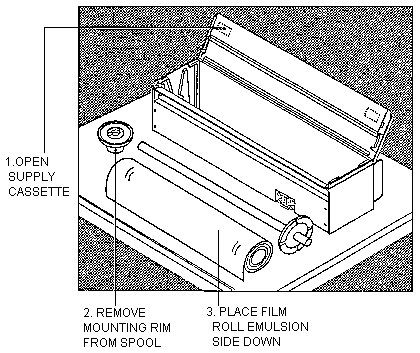
  6. Look at the mounting rim. It consists of two sections: an inner mounting rim and a supply spool. Twist the inner rim. Remove the rim from the spool.

    Loading Film on the Supply Cassette

    loadfilm.gif (9624 bytes)
  7. If the cassette contains a film roll, remove it from the spool. Place any unexposed film in a film case or container. Mark the container.

  8. Place the new roll of film on the table. Note the film position: rolled away from the cassette, emulsion down.

  9. Grasp the spool by the fixed rim. Insert the spool through the film roll.

  10. Put the removable rim in place on the spool. The inside surface of the rim should be flush with the roll.

  11. Twist the removable rim to tighten it on the spool.

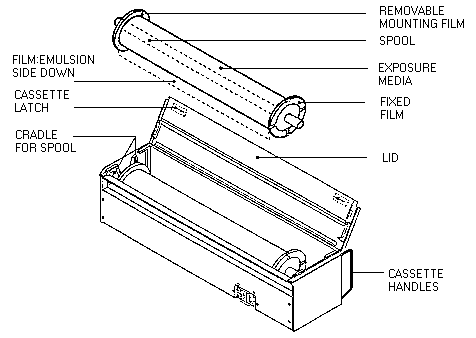
  12. You are ready to put the film in the cassette. Lower the spool into the cassette. The ends of the spool fit between the prongs of the cradle.

    Placing the Film on the Spool

    filmspol.gif (5397 bytes)
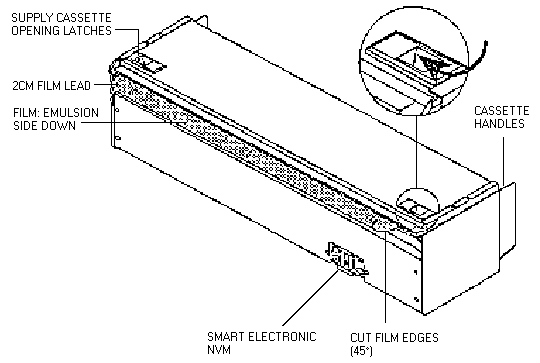
  13. Place a short piece of film over the edge of the cassette and shut the cassette lid. Allow 30 mm (approx. 1 in) of film to stick out of the cassette. Check that the film is straight (parallel to the cassette lid).
  14. Take a pair of scissors and cut the two corners of the film at a 45 degree angle. This prevents film from jamming during loading setup.

Mounting the Supply Cassette on the Imagesetter

  1. You are ready to leave the darkroom and load the imagesetter. Before you leave the darkroom, double-check that you have protected any unexposed film.
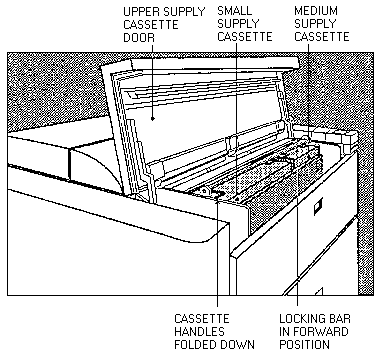
  2. Open the supply cassette compartment door. If you are loading the small or medium size cassette, push back the locking bar. The film must be extending from the bottom of the cassette on the side closest to the imagesetter body. (Away from you.)

    Replacing the Supply Cassette on the Dolev
    repcas.gif (8561 bytes)
  3. Fold down the cassette handles. Pull the locking bar forward. Close the compartment door.
  4. The large cassette has a separate outer compartment door. Open the outer door. Open the interior compartment door. To mount the large cassette (33 in) on the imagesetter, place it on the interior door and slide the cassette into place. Fold down the cassette handles and close the cassette chamber door.
  5. Replacing the Large Supply Cassette

    replg.gif (8425 bytes)
  6. Close the film compartment door.

    Copyright © 2005 Creo Inc. All rights reserved. Confidential. Back to top.