

Home | Contact Us | Submit Troubleshooting Info | Search | Help
Output | Software Solutions | Proofing | Color, Screening and Calibration | Scanning | Digital Photography | Consumables | POS
Home | Contact Us | Submit Troubleshooting Info | Search | Help
Output | Software Solutions | Proofing | Color, Screening and Calibration | Scanning | Digital Photography | Consumables | POS
Dolev 800/800V/800V² - Brisque Application Issues
Setting Time, Date and Measurement Units
General
Time and Date
Unit Defaults Setting
Color Units
The Set Up option contains all of the setting menus needed
to set time, date and measurement units.
Select Set Up (F2) from the Main Functions menu.
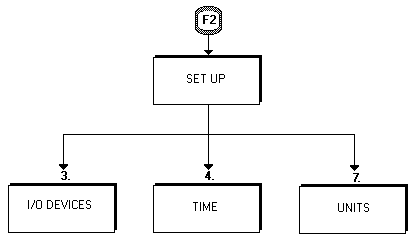
The time and date are usually set for the system. If you
need to change these for any reason, select Time (4.) on the Set Up menu. The time and
date appear next to the file name on the Whisper system full library list. You can print
the time and date as part of the label on exposed films. Follow the instruction on the
form:
When you complete the form, select Enter (F1).
Use the Units option to define measurement units and color
values.
Select Set Up (F2) from the Main Functions menu soft keys.
Select 7. Units from the Set Up menu, the following form appears on the screen:
Press the Space Bar to Change "Size" Units from the default unit, millimeters,
to inches. Press ENTER key to skip to the "Color Units" field.
The possible system color values are density, percentage, or system values. Press the Space Bar (on the cursor for interactive systems) to change the Color Units from the default.
| Enter Density: | The film density
of each separation can be defined within a range of upper and lower limits
(Dmax and Dmin). CreoScitex allows you to enter values from zero (0) in
the highlights to 400 in the shadows. We recommend, however, that the minimum
density be set to 25. The recommended maximum is 170. The 25-170 density range is equivalent to density values 0.25 to 1.7. When you select Density, you receive max 0.00/min 0.00. Enter the maximum and minimum density values. |
| Enter Percentage (of Dots on Separation) | The Percentage of dots on the
separation can have a range of 0% highlights to 100% shadows. |
| Enter System Values: | The CreoScitex system
sets a digital value corresponding to a density or dot area. When a picture
is scanned into the system, the optical density of the picture is converted
into voltages. The system converts the analog voltages into 256 distinct
system values. |
| Range: | 255 (highlights) to 0 (shadows). |
| Exit Color Unit Definition: | When you finish, select Save & Exit (f1). |