

Home | Contact Us | Submit Troubleshooting Info | Search | Help
Output | Software Solutions | Proofing | Color, Screening and Calibration | Scanning | Digital Photography | Consumables | POS
Home | Contact Us | Submit Troubleshooting Info | Search | Help
Output | Software Solutions | Proofing | Color, Screening and Calibration | Scanning | Digital Photography | Consumables | POS
Dolev 800 Field Service Diagnostics -
Diagnostics Configuration Modes
Overview
Default
(factory setting) Configuration Mode
Setup
Diagnostics can be operated in one of the following configurations, shown in figure and described in the table. Run SETUP.EXE only to Change the Configuration Mode.
Note: Default (factory setting) Configuration Mode is PANEL.
Dolev 800 Diagnostics Configuration Modes Connections.
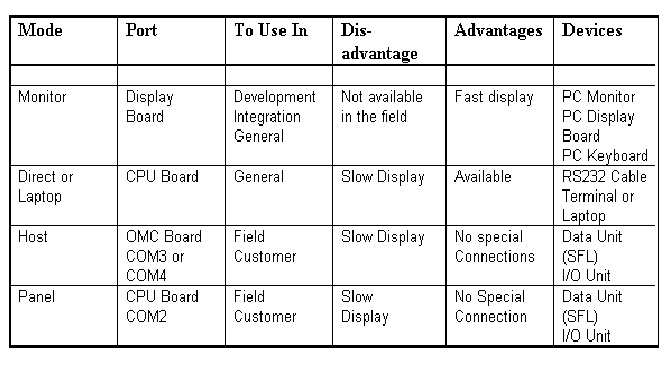
There are three ways to run SETUP:
After the Change of the Diagnostics Configuration Mode, User must Verify that the DIAG diskette is in the DOLEV 800 and Reboot the DOLEV 800 (Switch Off then Switch On).
LAPTOP Mode (or External PC or Dolev 800 (Monitor Mode)
PANEL Mode: Activate the Diagnostics.