Home | Contact Us | Submit Troubleshooting Info | Search | Help


    Output | Software Solutions | Proofing | Color, Screening and Calibration | Scanning | Digital Photography | Consumables | POS


Replacing a close cable 54 pitch chain


Product

  Dolev 800 V3/4

Background


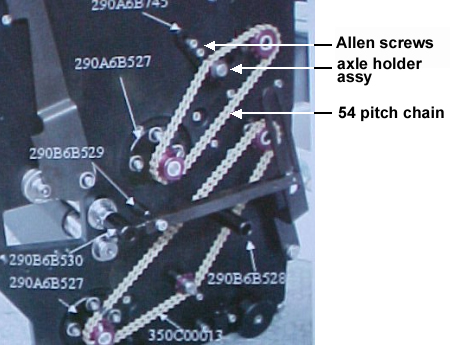
This procedure describes how to replace a close cable 54 pitch chain, P/N 350C00012.


Procedure

 
  1. Turn off the machine and disconnect the main power cable.
  2. Slide out the loading system.
  3. On the side of the loading system, remove the chain by removing the two Allen screws on the axle holder assy.
  4. Insert a new close cable 54 pitch chain.
  5. Push the axle holder assy downwards to tighten the chain, and then insert and tighten the two Allen screws on the axis holder assy.
  6. Reinsert the loading system.
  7. Connect the main power cable and turn on the machine.

Images


Test


Load film and verify smooth operation


See also


Dolev 800 V3/V4 Error Messages


Technical contact(s)
 

Content owner: Oded Zaccai
See the Escalation page for escalation contacts.

Date submitted
 

12 Jun 2002


Popups / Tool Tips for this Page

   Close this popup...

  1. Open the front, side, and top doors.
  2. Remove the right and left side covers.
  3. Pull out the right and left loading system locks.


Popups / Tool Tips for this Page

   Close this popup...

  1. Slide the loading system into the machine.
  2. Release the right and left loading system locks.
  3. Verify that the loading system is locked in place by shaking it gently.
  4. Install the right and left side covers.
  5. Close the top, side, and front doors.

    Copyright © 2005 Creo Inc. All rights reserved. Confidential. Back to top.