|
Product |
|
Dolev 800 V3/4
|
|
Background |
|
This procedure describes how to replace the
flat LDR cable
- DLV-800 V3 LDR cable, P/N 504C28986
- DLV-800 V4 LDR cable, P/N 504L3E781
|
|
Procedure |
|
-
Turn off the machine and disconnect the main power cable.
- .
-
From
the MB SOMC board, disconnect the flat LDR cable.
- Disconnect the flat LDR cable from the side of the standard
controller according to the Dolev version:
| Dolev 800 V3 |
|
Dolev 800 V4 |
-
Pull the power converter board out of the standard
controller to enable easy access.
- Disconnect the cable connector.
- Loosen the two cable
Jack socket screws and remove the flat LDR cable.
|
|
- Remove the MB SOMC board.
- Unplug the SCSI cable, P/N 199D20028.
- Remove the bracket by removing the Philips screw from the inside
of the E-box, (as shown below).
- Disconnect and remove the flat LDR cable.
|
- Install the flat LDR cable according to the Dolev version:
| Dolev 800 V3 |
|
Dolev 800 V4 |
- Insert the new flat LDR cable.
- Tighten the two cable Jack socket screws.
- Insert the cable connector.
- Connect the flat LDR cable to the MB SOMC (as shown below).
- Insert the power converter board into the standard controller.
|
|
- Connect the new flat LDR cable.
- Insert the bracket and secure it with the Philips screw.
- Connect the SCSI cable.
- Route the flat LDR cable under the power converter.
- Insert the MB SOMC board.
- Connect the flat LDR cable to the MB SOMC. (as shown below).
|
Warning: Never operate the plotter with both the V3 and V4
flat LDR cables connected.
- .
- Connect the main power cable and turn on the machine.
|
|
Images |
|
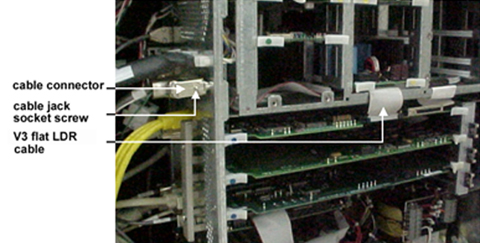
V3 flat LDR cable
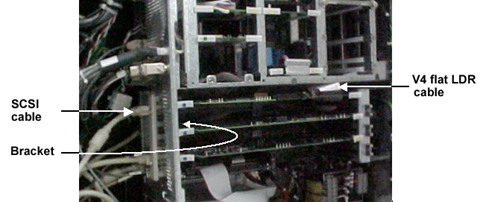
V4 flat LDR cable |
|
See also |
|
Dolev 800 V3/V4 Error Messages |
|
Technical contact(s) |
|
Content owner: Oded
Zaccai
See the Escalation page for escalation contacts. |
Date submitted |
|
12 Jun 2002 |


