Home | Contact Us | Submit Troubleshooting Info | Search | Help


    Output | Software Solutions | Proofing | Color, Screening and Calibration | Scanning | Digital Photography | Consumables | POS


DolevPatternExpose Installation for Windows 2000


Product


DolevPatternExpose

Supported CTF devices

  • Dolev® 800 family
  • Dolev 4press family
  • Dolev 200-450 family

Operating system


Microsoft® Windows® 2000 Professional


Background


This procedure describes how to install and work with DolevPatternExpose.

This procedure includes the following sections:


Requirements

 
  • PC station with minimum requirements (see Dolev Tiff Expose Version 4.000 for Windows 2000 Release Notes)
  • Windows 2000 Professional with Service Pack 4 installed on workstation
  • One free PCI slot on workstation
  • DBI board
  • DolevTiffExpose (DTE) software version 4.000 CD (or download from DTE index page)
    • DBI driver setup
    • Dolev Pattern Expose setup
    For links, refer to the DTE index page.

Procedure

  Installing DolevPatternExpose

Note: It is highly recommended to install DolevPatternExpose in the setup program's default location.

  1. Install the DTE 4.000 CD in the CD-ROM drive.
  2. In the CD-ROM drive, in the DPE_4.000 folder, double-click Setup.exe.
  3. In the DolevPatternExpose Welcome dialog box, click Next.
    DolevPatternExpose is automatically installed.
  4. Click Finish. A DolevPatternExpose icon is automatically added to the PC desktop.
Working with Dolev Pattern Expose
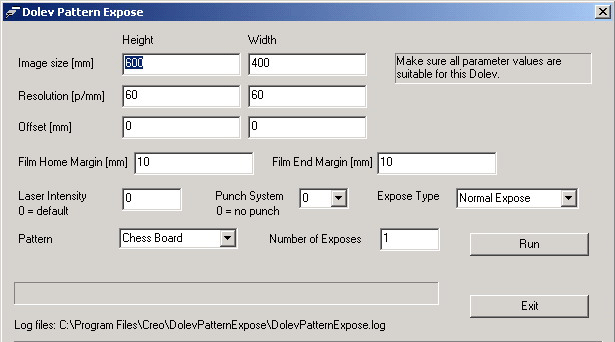
  1. On the PC Desktop, double-click the DolevPatternExpose icon.
  2. Insert the required parameters and click Run.
    Plotting begins.

    (Click the picture to enlarge it.)
    Note: After the start of plotting, the Run button becomes inactive until the end of plotting.


Technical contact(s)
 

Content owner: Kalman Shamir, Oded Zaccai
See the Escalation page for escalation contacts.

Date submitted
 

10 May 2005


    Copyright © 2005 Creo Inc. All rights reserved. Confidential. Back to top.