Home | Contact Us | Submit Troubleshooting Info | Search | Help


    Output | Software Solutions | Proofing | Color, Screening and Calibration | Scanning | Digital Photography | Consumables | POS


DolevTiffExpose Installation for Windows 2000


Product


DolevTiffExpose (DTE)

Supported CTF devices

  • Dolev® 800 Family
  • Dolev 4press family
  • Dolev 200-450 family

Operating system


Microsoft® Windows® 2000 Professional


Background


This procedure describes how to install DolevTiffExpose.

This procedure includes the following sections:


Requirements

 
  • PC station with minimum requirements (see Dolev Tiff Expose Version 4.000 for Windows 2000 Release Notes)
  • Windows 2000 Professional with Service Pack 4 installed on workstation
  • One free PCI slot on workstation
  • DBI board
  • DTE software version 4.000 CD (or download from DTE index page)
    • DBI driver setup
    • DTE version 4.000 setup
    For links, refer to the DTE index page.

Procedure


Installing the DBI driver in Windows

  1. Install the DBI board on any free PCI slot on the workstation.
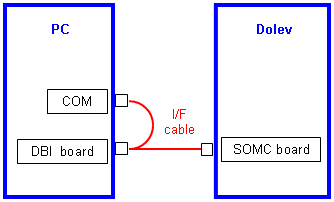
  2. Connect the interface cable between the SOMC board connector on the Dolev and the DBI board and COM connectors on the PC, as shown:
  3. Turn on the PC and insert the DTE 4.000 CD in the CD-ROM drive.
  4. In the CD-ROM drive, in the DBIdriver folder, double-click Setup.exe.
  5. In the DBI Driver Welcome dialog box, click Next.
    The DBI driver is automatically installed.
  6. After installation, a prompt appears to restart your computer. Click No.
  7. Right-click My Computer and select Properties.
  8. In the System Properties window, in the Hardware tab, click the Device Manager button.
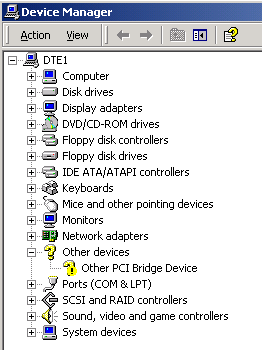
  9. In the Device Manager tree, select Other Devices>Other PCI Bridge Device and press Delete to uninstall.
  10. In the Confirm Device Removal warning message, click OK.
  11. Restart your computer. The DBI driver is automatically defined.
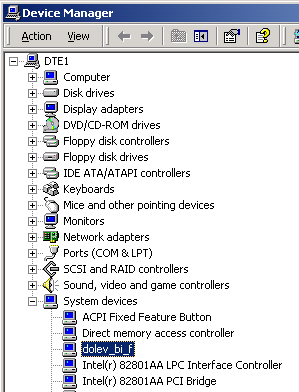
  12. To confirm that the driver is properly installed, in the Device Manager tree, select System devices and verify that the dolev_bi_f driver exists.
  13. Close the Device Manager window.

Installing DTE

Note: It is highly recommended to install DTE in the setup program's default location.

  1. Insert the DTE 4.000 CD into the CD-ROM drive.
  2. In the CD drive, select DTE_4.000 > Setup and double-click Setup.exe.
  3. In the Dolev TiffExpose Welcome dialog box, click Next, and then click Next again.
  4. In the Setup Type dialog box, select Typical, and then click Next.
    Dolev TiffExpose is automatically installed.
  5. Click Finish.
  6. Remove the CD and restart the workstation.

Technical contact(s)
 

Content owner: Kalman Shamir, Oded Zaccai
See the Escalation page for escalation contacts.

Date submitted
 

10 May 2005


    Copyright © 2005 Creo Inc. All rights reserved. Confidential. Back to top.