Home | Contact Us | Submit Troubleshooting Info | Search | Help
Output | Software Solutions | Proofing | Color, Screening and Calibration | Scanning | Digital Photography | Consumables | POS
Home | Contact Us | Submit Troubleshooting Info | Search | Help
Output | Software Solutions | Proofing | Color, Screening and Calibration | Scanning | Digital Photography | Consumables | POS
What is FCO Tracker? More...
FCO Tracker is a file utility that enables service personnel
to keep track of the Field Change Orders (FCOs) implemented on a specific
platesetter.
Each FCO has its own unique FCO Tracker file. Whenever an FCO is implemented,
its associated FCO Tracker file should be installed.
Why do I need FCO Tracker? More...
Is FCO Tracker compatible with all Lotems and all operating systems? More...
FCO Tracker is compatible with all Lotem models and all versions of Microsoft® Windows® operating systems.
How do I implement FCO Tracker? More...
There are two methods for implementing FCO tracker:
Implement FCO Tracker via the FCO kit diskette (When
implementing a new FCO)
Commencing from November 2004, each individual FCO kit
is shipped with a diskette. The diskette contains two small files,
a *.bat file and a ins_date.exe file.
The *.bat file is unique to that specific FCO.
Implement FCO Tracker via TechPlanet (Use this method for previously installed FCOs)
- Insert a blank diskette into your computer.
- Navigate to the FCO page.
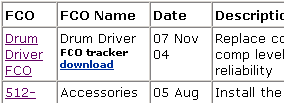
- Locate the specific FCO that was implemented on the platesetter, and click Download:
- Save the compressed file to your desktop.
- Extract the compressed file to the diskette in your A drive.
Two files appear:
- *.bat file
- ins_date.exe file.
Note: The ins_date.exe file is hidden, and therefore will only be displayed if your computer is configured to show hidden files.
Important:
If you are updating the list of implemented FCOs on a platesetter, and need to extract more than one FCO Tracker file (one file per FCO) to a single diskette, the following message appears:
Click Yes. A further message appears:

Click Yes to overwrite the ins_date.exe file.- Insert the diskette into the platesetter’s diskette drive.
- On the Lotem, locate drive A.
- Double-click the FCO Tracker file (FCOxxx-xxxxx.bat).
- Remove the diskette.
How do I view which FCOs have been implemented on the platesetter? More...
regedit and click OK: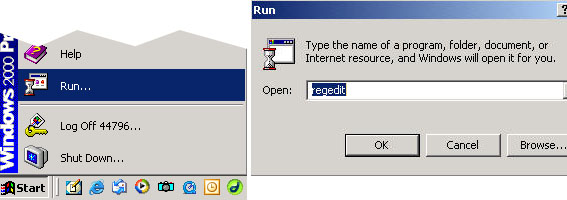
Do I need to implement FCO Trackers for FCOs that have previously been released? More...
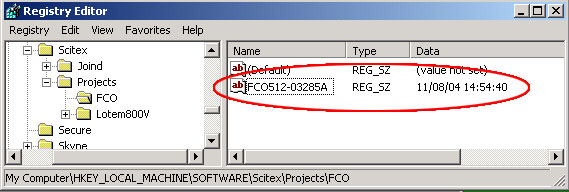
When service personnel visit a site, they should visually check to see which FCOs have been implemented on the platesetter, and compare this to the FCO Tracker list displayed in the Registry Editor window. If the list is incomplete, the service personnel should navigate to the FCO Page and download the FCO Tracker utility file associated with implemented FCO.
How do I remotely view which FCOs have been implemented on the platesetter via (RSS)? More...
I have mistakenly implemented the wrong FCO Tracker. What should I do? More...
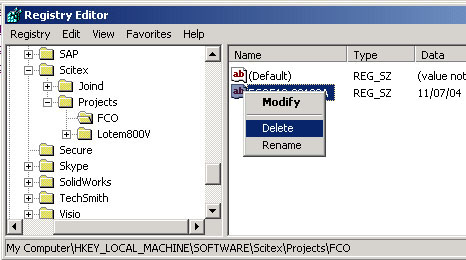
If you have mistakenly installed an FCO Tracker file: