Background
|
|
The objective of the Focus test is to find the focus stepper motor value
that enables the focus of the beams to coincide with the plate surface.
To verify that the calibrated focus value is correct, expose the SDT
file from Brisque and examine the plate, see Scitex
Digital Target (SDT). If the focus value is not correct, perform the
focus test procedure.
|
Procedure
|
|
Before performing the focus test, disable
edge detection.
Note: The focus stepper motor value
is dependent on the plate type, so repeat this test for each plate type
and thickness that the customer uses.
- Load a plate.
- Open the Lotem Calibration dialog box:
- For Lotem 400 Xpose—on the Xpose Utilities panel, double-click
LotemCalib.
- For Lotem 400—proceed as follows:
- In Brisque, from the Launch Pad, open the Setup panel, and then
double-click Devices.
- In the Output Device Handling dialog box, in the Device section,
select Plate Setter > Lotem > Lotem400.
- In the Operations section, select Lotem Calibration.
- In the Lotem Calibration dialog box (example shown for Lotem Xpose),
in the Calibration Type box, select Focus. The Current
Plate type and Plate Sensitivity parameters of the plate
that you loaded are automatically transferred from Lotem Controller.
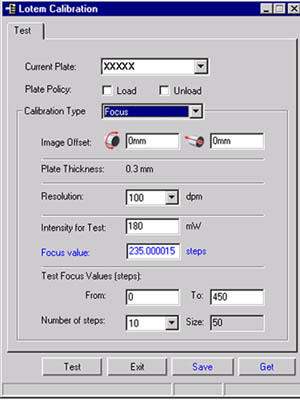
- Define the Plate Policy:
- Load plate—Automatically loads a new plate before the
test begins. If you clear this option, you can reuse the plate for
additional calibration tests.
- Unload plate—Automatically unloads the plate after the
test. If you clear this option, you can reuse the plate for additional
calibration tests.
- Define the Image offset values:
- Horizontal offset—The value around the drum in mm
- Vertical offset—The value along the drum in mm
If you use the same plate for several tests, define different offset values
for each test.
Note: The (0,0) offset coordinate is located at the upper-left
corner of the plate.
- In the Intensity for Test box, type the laser intensity.
Note: It is recommended to use a value 40% lower than the listed
default value.
- In the Focus value box, type the default value or the last-saved
value.
- In the Test Focus Values [steps] area, type the test range
for the stepper motor values in the From and To boxes.
Note: The recommended range is 100–400 motor steps.
- In the Number of Steps list, select the number of exposures
in the test focus value range. The recommended minimum number of steps
is 10.
The Lotem Controller application automatically calculates the size of
each step interval.
Size of step = (To - From)/(Number of Steps -1)
This interval is displayed in the Size box.
Note: The interval value cannot be modified. It is intended to
be a quick reference for the platesetter operator.
- Click Test to initiate the focus test. The application performs
several exposures.
Note: The Get button enables you to load a previous focus
test result from Lotem Controller.
- When the exposure is completed, develop the plate and examine the
results.
- In the exposed batch, select the target with the highest exposure
(the lightest or darkest target, depending on the plate type), and note
the focus stepper motor value of the selected target.
- In the Calibration - Focus Calibration dialog box, in the Focus
Value box, type the focus stepper motor value of the selected target.
This value is the optimal focus for the tested plate thickness.
- Click Save. The focus stepper motor value is automatically
transferred to Lotem Controller.
- If required, repeat the test for other plate types and thicknesses.
|

