Home | Contact Us | Submit Troubleshooting Info | Search | Help
Output | Software Solutions | Proofing | Color, Screening and Calibration | Scanning | Digital Photography | Consumables | POS
Home | Contact Us | Submit Troubleshooting Info | Search | Help
Output | Software Solutions | Proofing | Color, Screening and Calibration | Scanning | Digital Photography | Consumables | POS
|
|
|||
Product |
Note: This tip applies to manual loading machines, software version 1.50.08 and up. |
||
|
|
|||
Component |
Head grippers |
||
|
|
|||
Symptoms |
Poor registration |
||
|
|
|||
Cause |
During actuation and the opening of the head grippers, the drum moves, due to the mechanical configuration of the head grippers. |
||
|
|
|||
Solution |
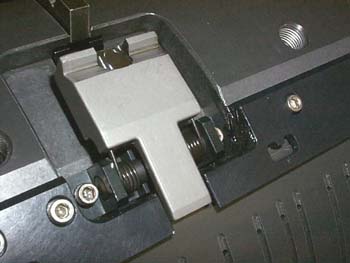
The grippers were redesigned with slots instead of V grooves to enable the drum to complete its movement before actuation. In addition, the software is being updated to support the new grippers and a new loading cycle. All new machines have the new grippers. Since the new software version is not yet released, Patch 4 was issued to support the new grippers and new loading cycle. Patch 4 contains four additional registry parameters:
Note: All values are default. If your machine has the new grippers, shown below, install Patch 4 (download) for version 1.50.08. A new parameter in the registry enables you to check if the new head
grippers are installed: |
||
|
|
|||
See also |
|
||
|
|
|||
Technical contact(s) |
|||
Submitted by |
|||
Date submitted |
13 Feb 2003 |
||