Home | Contact Us | Submit Troubleshooting Info | Search | Help
Output | Software Solutions | Proofing | Color, Screening and Calibration | Scanning | Digital Photography | Consumables | POS
Home | Contact Us | Submit Troubleshooting Info | Search | Help
Output | Software Solutions | Proofing | Color, Screening and Calibration | Scanning | Digital Photography | Consumables | POS
Product |
Lotem 800 | ||
Background |
Adjust the carriage motor fine detector to resolve intermittent image shifts along the drum. |
||
Procedure |
Adjusting the coarse HP
Adjusting the fine HP
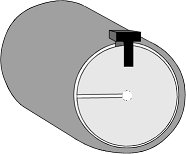
Figure 1 - Fine detector slot position Note: Make sure the wheel is in the middle of the slotted detector.
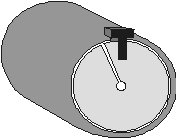
Figure 2 - Fine detector slot position after adjustment |
||
Test |
|
||
Technical contact(s) |
Content owner: Itai Peperovich |
||
Date submitted |
20 May 2002 |
||
 Hardware>Expose
System>Carriage System>Carriage Motor (double-click).
 Hardware>Expose
System>Carriage System>Carriage Motor (right-click).