
Home | Contact Us | Submit Troubleshooting Info | Search | Help


    Output | Software Solutions | Proofing | Color, Screening and Calibration | Scanning | Digital Photography | Consumables | POS


Plate Is Stuck in the Lotem 800 Punch


Product

 
  • Lotem™ 800 (S-speed)
  • Lotem™ 800 (F-speed)
  • Lotem™ 800 Quantum
  • Lotem™ 800 with Spectrum

Error


'Punch motor doesn't get back to Hp' (8608, 4626)
'Punch motor error' (4603)


Symptoms


During loading, the plate gets stuck in the punch, the machine stops and an error message is displayed.


Cause

  Probable causes include the following:
  • Punch problems
  • Double loading

Solution


This section includes a detailed troubleshooting procedure. If at any point you feel that you have found the source of the problem, you can either process several plates to verify that the problem has been resolved, or you can continue to the end of the procedure.

  1. Review all generic troubleshooting questions with the customer.
  2. Open the front door and manually remove the plate(s) from the machine.
    Note: If two plates were found stuck in the punch, refer to the troubleshooting document, Double Loading.
    If the plate(s) cannot be removed from the punch, close the front door and release the punch. If you cannot release the punch, answer all generic troubleshooting questions and then, contact your service representative.:
    1. If the machine is a:
    2. Perform Tip #45.
    3. Further inspect the punch rod and verify whether it is damaged and/or deformed. If it is:
    4. If the punch rod is intact:

  3. Visually inspect the removed plate in the area that is, or should have been punched. Look for:
    • Rough edges.
    • Partial cut.
    • Dent, instead of a punched hole or notch.

    If found, answer all generic troubleshooting questions and then, contact your service representative, replace the punch.

  4. Visually inspect the punch to verify whether the powerful punch motor has been installed. If it has not been, perform FCO 27281.
  5. Further inspect the punch. Look for damaged and/or missing punch guides. If one or more of the punch guides is damaged and/or missing, answer all generic troubleshooting questions and then, contact your service representative.
    • Remote only: Ask the customer whether the guide is missing from the spiral punch or is a custom punch. Then, order the punch reliability FCO 27707, Version B, have it shipped to the customer, and schedule a field service call.
    • Install or replace the punch guides, as required according to the punch reliability FCO 27707, Version B.
  6. Visually inspect the punch hole for debris, plate slug and/or dirt. If found, pass the edge of a plate (preferably a used one) back and forth through the punch to clear the slug and/or debris.
  7. Close doors, as required. Then, perform plate loading to verify whether the problem is resolved.
  8. Open the cassette and insert it into the machine. Leave the front door open and, using a cheater, perform plate loading.
    Note: If the customer is using a dual cassette, be sure to redefine the cassette as dual loading before leaving the site.
  9. Watch the plate as it is loaded and verify whether the problem has been resolved.
  10. Perform the steps described in, "Before You Finish".

See also


Double LoadingDouble Loading


Technical contact(s)
 

Itai Peperovich

Submitted by
 

Boris Gendlesman

Date submitted
 

29 Apr 2002


Popups / Tool Tips for this Page

   Close this popup...   To release the punch:

  1. In the PC Controller, select Utilities > Hardware. The Hardware dialog box is displayed.
  2. In the Hardware dialog box, double-click Punch System> Motors> Punch Motor #X (where X is the ID number of the punch that is stuck). The Punch Motor dialog box is displayed.
    Note: If you do not know the ID number of the stuck punch, you can randomly select a punch and continue as follows.
  3. In the Punch Motor dialog box, select the Operation tab.
  4. In the Operation tab, click Start. The punch is opened (released) and the plate can now be removed. If the punch that is released is not the punch that is stuck:
    • Select another punch from the Motor drop-down menu, and click Start to release that punch. Repeat this step, as required until the stuck punch is released.

   Close this popup...   To inspect the punch hole:

   Close this popup...   To manually remove the plate from the punch if it cannot otherwise be easily removed:
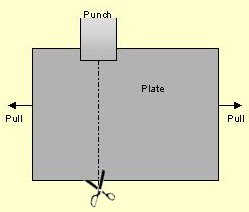
  1. Use scissors to cut the plate along a line that is perpendicular to the punch, as shown below.
  2. Hold the plate on both sides of the line you have cut and pull to the right and the left simultaneously to separate, and remove the plate.

    Copyright © 2005 Creo Inc. All rights reserved. Confidential. Back to top.