Home | Contact Us | Submit Troubleshooting Info | Search | Help


    Output | Software Solutions | Proofing | Color, Screening and Calibration | Scanning | Digital Photography | Consumables | POS


Adjusting the 'plate on unload detector'


Product

 
  • Lotem® 800 with Omron® interlocks
  • Lotem 800 Quantum
  • Lotem Quantum Spectrum

Background


This procedure describes how to adjust the 'plate on unload detector', assembled on the unloading tray.

Note: The unloading tray has two part numbers, depending on whether packing is included or not:

  • Unloading tray excluding packing: p/n 507F3E972
  • Unloading tray including packing: p/n 514-00034A with packing

Procedure

 
  1. Remove the upper rear panel of the platesetter.
  2. The detector has two adjustment screws:
    • L/D
    • Sens (sensitivity)
    Make sure the L/D adjustment screw is in the L position.
    The Sens adjustment screw is for varying the sensitivity of the detector.
  3. Make sure that the rear door of the platesetter is closed during the adjustment procedure.
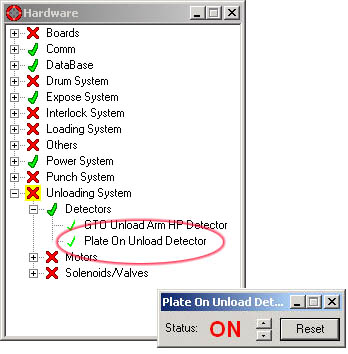
  4. In Lotem Controller, navigate to the Plate On Unload Detector window (Hardware > Unloading System > Detectors) and check the status of the detector.
    If the status is ON, the detector is detecting the rear door of the platesetter (meaning the detector sensitivity is too high):


  5. Adjust the Sens screw until the status of the detector is OFF.
  6. Check that the detector is working correctly by performing a few loading/unloading sequences.
  7. Make further adjustments if required.

Technical contact(s)
 

Content owner: Itai Peperovich
See the Escalation page for escalation contacts.

Date submitted
 

29 Dec 2003


    Copyright © 2005 Creo Inc. All rights reserved. Confidential. Back to top.