Home | Contact Us | Submit Troubleshooting Info | Search | Help


    Output | Software Solutions | Proofing | Color, Screening and Calibration | Scanning | Digital Photography | Consumables | POS


Installing a paper disposal slide - Kit part number 510K3R294


Product

 
  • Lotem® 800 with Omron® interlocks
  • Lotem 800 II
  • Lotem 850
  • Lotem 800 Quantum
  • Lotem Quantum Spectrum
  • MCU for Lotem 800

Background


Paper disposal units on platesetters with an Omron chassis can hold upto 50 sheets of paper. If this number is exceeded the platesetter automatically stops.
After installing the paper disposal slide, the platesetter can dispose of approximately 100 sheets of paper before it stops.


Requirements


Kit p/n 510K3R294 should contain the following parts:

Description Part No. Quantity
Extension paper guide 288A7B318 1
Paper guide 298A7B321 1
Holder guide Q850 290A7B320 2
Holder guide Q800 290A7B319
2
Black adhesive label 382-00287A 1

Procedure


The following procedure describes how to install the paper disposal slide. When the slide has been installed the paper is guided onto the floor of the paper disposal unit.

To install the slide:

  1. Open the doors of the paper disposal unit.
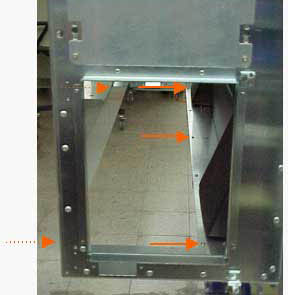
  2. Remove the lower bracket by removing the five screws located at the foot of the paper disposal unit:


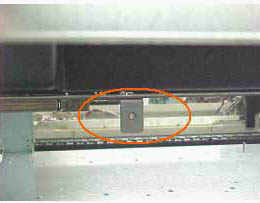
  3. Attach the two corner brackets (p/n 290A7B319/20) to the platesetter with two 8*32 3/8 hex screws and spring washers:


  4. Use two screws to attach the slide (p/n 298A7B321) to the slide extension (p/n 288A7B318).
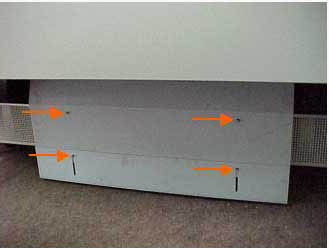
  5. Position the slide on top of the corner brackets and secure it to each bracket with one screw and flat washer:

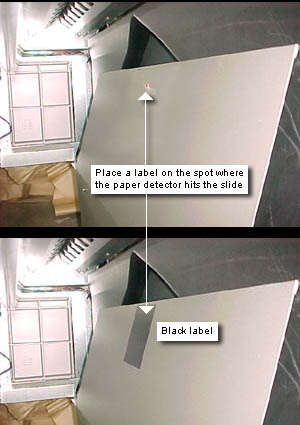
  1. A paper detector is located on the opposite side of the slide. Place the black adhesive label (p/n 382-00287A) on the exact spot where the eye of the detector focuses onto the slide:


  2. In Lotem Controller, navigate to the following parameters:
    • Hardware > Loading System > Loading System > Max Num Of Papars In Bin For Error and amend the value from 50 to 90.
    • Hardware > Loading System > Loading System > Max Num Of Papars In Bin For Warning and amend the value from 30 to 60.


Technical contact(s)
 

Content owner: Itai Peperovich
See the Escalation page for escalation contacts.

Date submitted
 

24 Nov 2003


    Copyright © 2005 Creo Inc. All rights reserved. Confidential. Back to top.