Home | Contact Us | Submit Troubleshooting Info | Search | Help


    Output | Software Solutions | Proofing | Color, Screening and Calibration | Scanning | Digital Photography | Consumables | POS


Resetting Local3 boards (BSL loading) v3.80 on Lotem 800 II


Product


Lotem® 800 II Family


Background


When upgrading to Lotem Controller version 3.80, the Local3Monitor (HEX file) is replaced. On subsequent startups, this may cause a problem with loading the Local3 board components and the Left/Right local doesn't respond error message may appear. This procedure solves the communication problem.


Requirements


A BSL cable is the only necessary part for completing this procedure.


Procedure


Note: The left and right local boards must be reset separately. For MCU machines, swap between the left local and the MCU local, then follow the left side procedure.

  1. Open the front door.
  2. Open the left side door.
  3. Exit Lotem Controller.
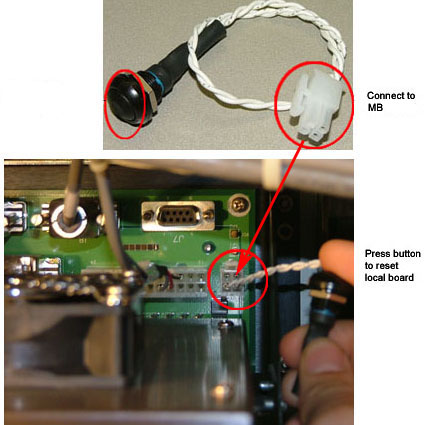
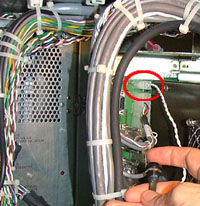
  4. Insert the BSL cable into the BSL connector located on the local motherboard (BSL NMI controller).


  5. To reset the local board, press the black button at the end of the BSL cable.
  6. Disconnect the BSL cable and close all the doors.
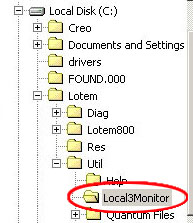
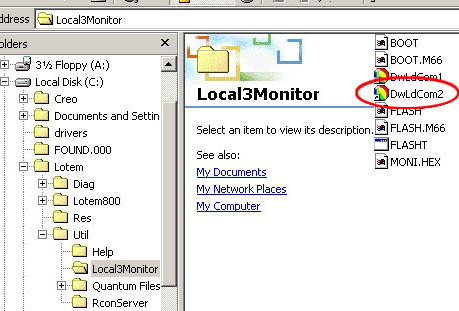
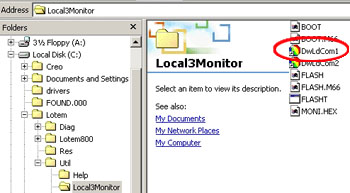
  7. Open Microsoft® Windows® Explorer and select: C:/Lotem/Util/Local3Monitor.


Resetting the left side local board
  1. Double-click DwLdCom2.


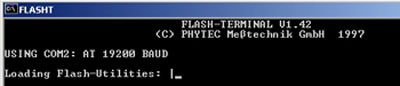
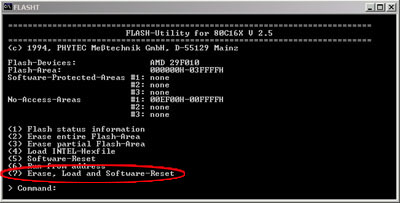
    The FLASHT command window opens, with a spinning cursor.


  2. Wait until the options and command lines appear.


  3. Type 7.


  4. Type Y (Yes).


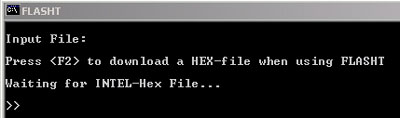
  5. Press f2.
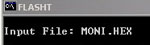
  6. At the Input file command line, type MONI.HEX and press Enter.


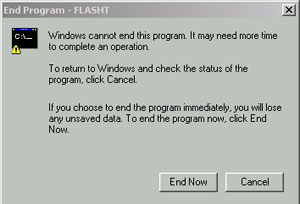
    The monitor files start loading. When Executing_Software_Reset.. appears, close the FLASHT command window.


    The End Program message appears.


  7. Click End Now.
  8. Restart the Lotem platesetter and open Lotem Controller.

Resetting the right side local board

  1. Open the front door.
  2. Open the right side door.
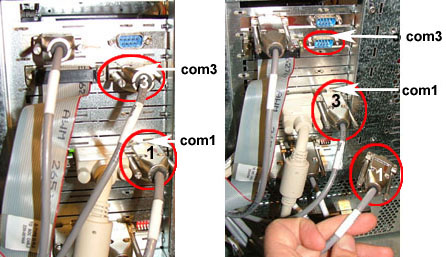
    Note: This procedure only works with com1 and com2 so you must switch the connections to the right local board as set out in step 3.
  3. On the right local mother board:
    1. Disconnect cable 3 from com3.
    2. Disconnect cable 1 from com1.
    3. Connect cable 3 to com1 (where cable 1 was previously connected).


  4. Insert the BSL cable into the right local motherboard.


  5. To reset the local board, press the black button at the end of the BSL cable.
  6. Remove the BSL cable.
  7. Close all the doors.
  8. In the Local3Monitor folder, double-click DwLdCom1.


    The FLASHT window appears with a spinning cursor.


  9. Follow steps 2–7 of the procedure for the Left Local Board.
  10. Reconnect cable 3 to com3 and cable 1 to com1.

Test


Restart Lotem Controller. Make sure local board communication errors are not generated.


Technical contact(s)
 

Content owner: Nir Peleg
See the Escalation page for escalation contacts.

Date submitted
 

06 Feb 2005


    Copyright © 2005 Creo Inc. All rights reserved. Confidential. Back to top.