|
Product |
|
Lotem® 800 Family platesetters
|
|
Background |
|
This procedure describes how to install distribution board software on
the Lotem 800 family of platesetters.
|
|
Requirements |
|
Lotem CTP family distribution board setup CD
(part number 651-00476A)
|
|
Procedure |
|
- Quit Lotem Controller.
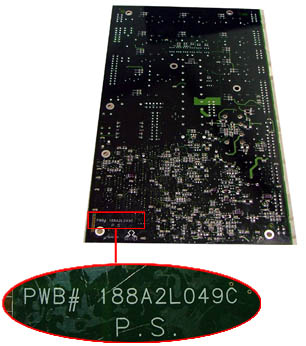
- Before installing the distribution board, make a note of the PWB#.
The PWB# is located in the lower-left corner of the distribution board:
Important:
PWB# 188A2L049B corresponds to distribution board revision B
PWB# 188A2L049C corresponds to distribution board revision C
- Insert the Lotem CTP family distribution board setup
CD (part number 651-00476A) into the CD-ROM drive. On the desktop, double-click
My Computer, locate the Lotem CTP family distribution
board setup CD, and then double-click DistributionCfg.exe.
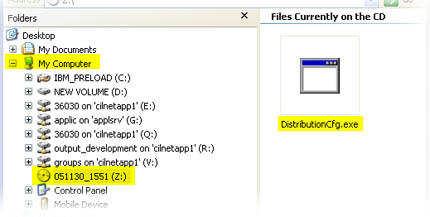
Or,
download the DistributionCfg.exe
file from TechPlanet and double-click on the file name.
The Distribution Configuration dialog box appears.
- In the Distribution Configuration dialog box, select the option corresponding
to the PWB#:
- Click Revision B for PWB# 188A2L049B
- Click Revision C or high for PWB# 188A2L049C
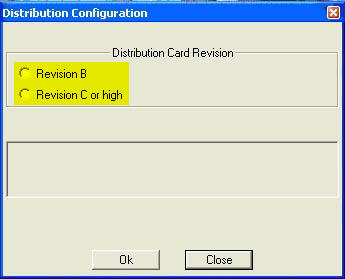
- Click OK.
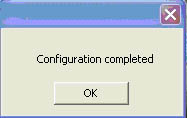
- A configuration completed message appears. Click OK:
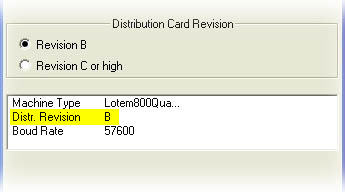
- If Revision B is selected, the following information appears in the
Distribution Configuration dialog box:
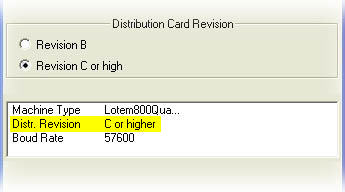
- If Revision C is selected, the following information appears in the
Distribution Configuration dialog box:
|
|
Test |
|
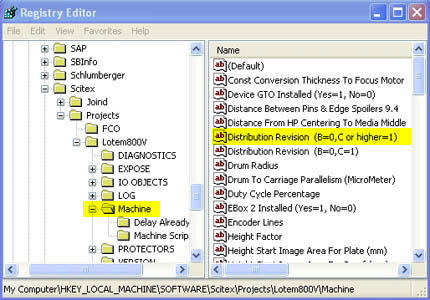
- In the Registry Editor window, select Machine
(HKEY_LOCAL_MACHINE\SOFTWARE\Scitex\
Projects\Lotem800V\Machine) and locate the Distribution
Revision parameters.
- Check that the data value for the
Distribution Revision (B=0,C or higher=1) parameter
has changed accordingly:
|
Technical contact(s) |
|
Content owner: Nir Peleg
See the Escalation page for escalation
contacts.
|
Date submitted |
|
01 Dec 2005
|

