Home | Contact Us | Submit Troubleshooting Info | Search | Help


    Output | Software Solutions | Proofing | Color, Screening and Calibration | Scanning | Digital Photography | Consumables | POS


Testing and adjusting the main valve detector on the Lotem MCU


Product


Lotem® MCU


Background


In Lotem Controller’s Hardware tree, there are two status indicators. The indicators determine whether or not the main valve detector (on the Lotem MCU) needs adjusting.
This procedure describes how to test the status of the main valve detector, and if required, how to adjust the detector.


Procedure


To test the status of the main valve detector:

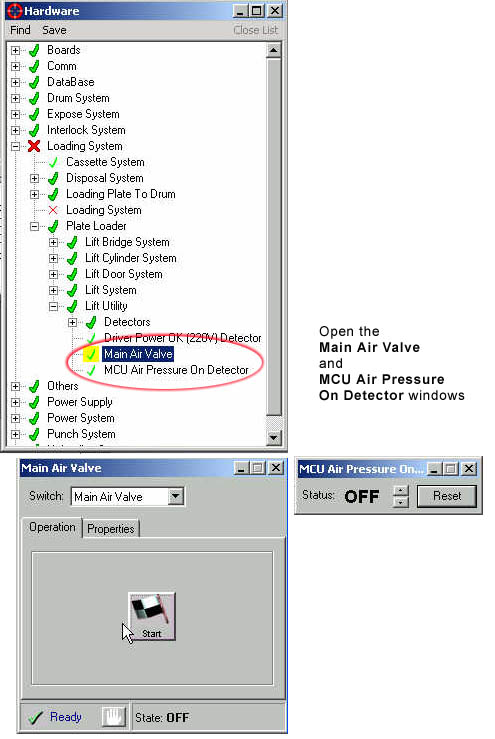
  1. In Lotem Controller’s Hardware tree, open the Main Air Valve and the MCU Air Pressure On Detector windows. Make sure the two windows can be viewed simultaneously:


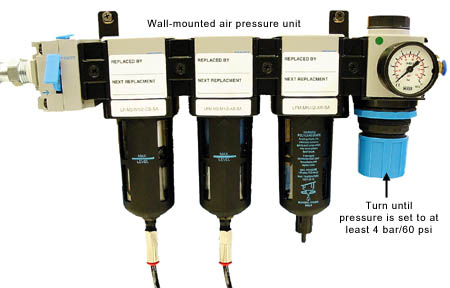
  2. On the wall-mounted air pressure unit, turn the blue handle until the air pressure gauge is set to at least 4 bar (60 psi):


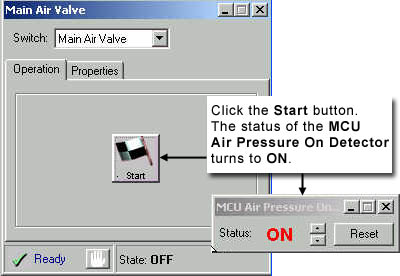
  3. In the Main Air Valve window, click the Start button. This should cause the status of the MCU Air Pressure On Detector to revert from OFF to ON:


    IMPORTANT: If the status remains OFF, the main air valve detector needs adjusting.

To adjust the main air valve detector:

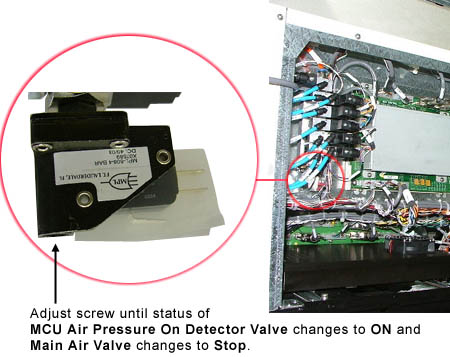
The main air valve detector is located under the manifold.
An adjustable screw on the detector determines the strength of the aiflow.

  1. Using a hex key, adjust the screw on the detector until the status of the MCU Air Pressure on Detector reverts to ON and the Start button in the Main Valve window reverts to Stop.


  2. On the wall-mounted air pressure unit, turn the blue handle until the air pressure gauge is set to at least 6 bar (90 psi).


Test


To test the main air valve detector adjustment:

  1. On the wall-mounted air pressure unit, turn the blue handle until the air pressure gauge is set to at least 6 bar (90 psi).
  2. In the Main Air Valve window, click the Start button. The status of the MCU Air Pressure On Detector changes from OFF to ON.
  3. Decrease the air pressure by turning the blue handle and make sure that the MCU Air Pressure On Detector reverts from ON to OFF when the pressure is below 4 bar (60 psi).

Technical contact(s)
 

Content owner: Nir Peleg
See the Escalation page for escalation contacts.

Date submitted
 

10 Mar 2004


    Copyright © 2005 Creo Inc. All rights reserved. Confidential. Back to top.