Home | Contact Us | Submit Troubleshooting Info | Search | Help


    Output | Software Solutions | Proofing | Color, Screening and Calibration | Scanning | Digital Photography | Consumables | POS


Cleaning the drum vacuum holes on the Lotem 400, Lotem 800, and Magnus 400 platesetters


Product

 
  • Kodak® Lotem® 800 platesetter
  • Kodak Lotem 800 II platesetter
  • Kodak Lotem 400 platesetter
  • Kodak Lotem 400 Quantum platesetter
  • Kodak Magnus™ 400 platesetter

Background


The drum vacuum holes invariably fill up with debris and dirt. In order for the vacuum to be effective, it is essential that the holes remain unblocked and dirt-free.
This procedure describes how to clean the drum vacuum holes.


Requirements


Drum Holes Cleaning Kit (part number 510K1R593)


Procedure

 
  1. Remove any plates from the drum.
  2. In Kodak Lotem/Magnus Controller, start the drum vacuum.
  3. The Drum Holes Cleaning Kit (part number 510K1R593) contains two 0.8-mm drill bits (part number 395A10180). Insert the 0.8-mm drill bit into the cleaning drill.
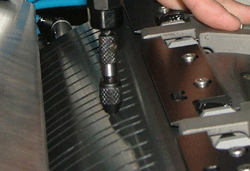
  4. Starting from the first set of holes, systematically insert the cleaning drill bit approximately 2.5 cm (1 inch) into each drum vacuum hole:


    Repeatedly prod the vacuum holes until they are dirt free and unblocked.
    Note: Verify that the customer cleans the drum holes properly, on a regular basis.

Technical contact(s)
 

Content owner: Alon Davidor
See the Escalation page for escalation contacts.

Date submitted
 

11 Apr 2005


    Copyright © 2005 Creo Inc. All rights reserved. Confidential. Back to top.