Home | Contact Us | Submit Troubleshooting Info | Search | Help


    Output | Software Solutions | Proofing | Color, Screening and Calibration | Scanning | Digital Photography | Consumables | POS


Configuring HyperTerminal to connect to the Lotem 800 II TMCE board


Product


Kodak Lotem 800 II platesetter


Background


This procedure describes how to access the Lotem 800 II TMCE board via Microsoft HyperTerminal.


Procedure

 
  1. Quit Kodak Lotem Controller.
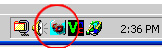
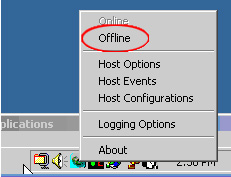
  2. On the desktop, right-click the Kodak Service Shell icon and select Offline.


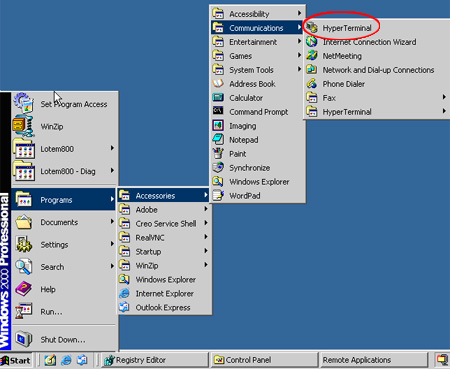
  3. Locate, and then start HyperTerminal
    (C:\Programs\Accessories\Communications\HyperTerminal).


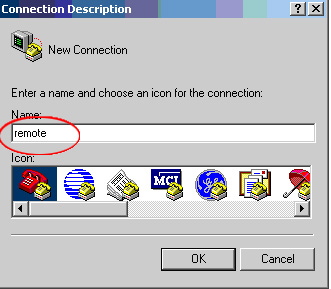
  4. In the Connection Description dialog box, in the Name box, enter a name for the new connection and click OK.


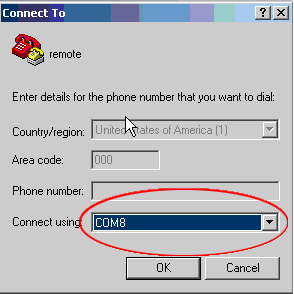
  5. In the Connect To dialog box, in the Connect using list, select COM8 and click OK.


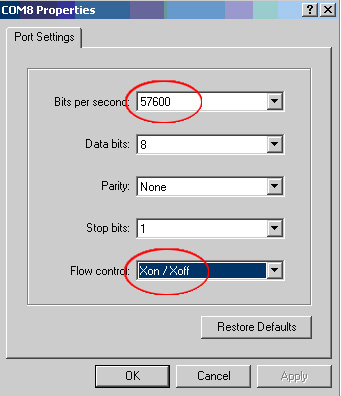
  6. In the COM8 Properties dialog box, onIn the Port Settings tab, perform the following actions:
    • In the Bits per second list, select 57600.
    • In the Flow control list, select Xon / Off.


    • Click OK.
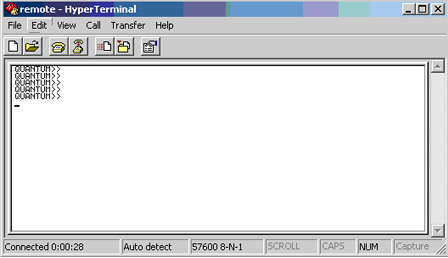
  7. In the remote - HyperTerminal window, press Enter.


Technical contact(s)
 

Content owner: Nir Peleg
See the Escalation page for escalation contacts.

Date submitted
 

05 Jul 2006


    Copyright © 2005 Creo Inc. All rights reserved. Confidential. Back to top.