Home | Contact Us | Submit Troubleshooting Info | Search | Help


    Output | Software Solutions | Proofing | Color, Screening and Calibration | Scanning | Digital Photography | Consumables | POS


Cleaning the optic lens on ThermoFlex Mid and Narrow


Product

 
  • ThermoFlex® Mid
  • ThermoFlex Narrow

Background


Once you expose without the UDRC or Fuchs debris removal device, dirt accumulates on the optic lens. A dirty optic lens can cause low throughput. This procedure describes how to clean the optic lens. It is recommended to clean the optic lens every six months.


Procedure

 
  1. In ThermoFlex Controller, click the Maintenance button and open the top front door.
  2. Lift up the unload tray.
    Note: On some of the older models, you must remove the four screws from the unload tray and remove the unload tray.
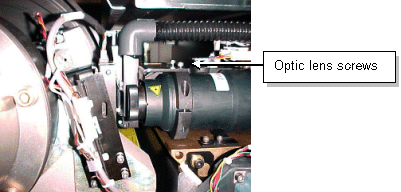
  3. Remove the two hex screws from the nozzle bracket on the optic lens assembly, as shown.
  4. Turn the optic lens protective cover clockwise to open it.
  5. To remove the lens protector, push the nozzle bracket as far as possible toward the drum and then remove the lens protector.
    Note: If there is not enough room to lift out the lens protector, tilt the carriage upward to enable lifting it out.
  6. Use alcohol and rice paper to clean the optic lens.
  7. Install the lens protector, and secure it by inserting and tightening the two hex screws on the nozzle bracket that you removed in step 4.
  8. Adjust the nozzle.
  9. Close the unload tray (or reinstall it).
  10. Close all panels and doors.
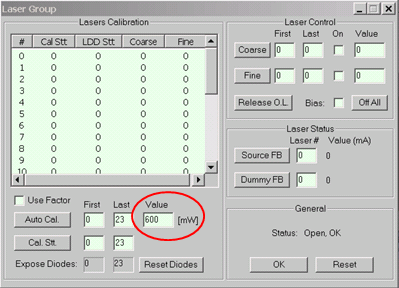
  11. In the Laser Group dialog box, verify that the laser calibration value is 600 mW.

Technical contact(s)
 

Content owner: Viki Arviv
See the Escalation page for escalation contacts.

Date submitted
 

05 Oct 2004


    Copyright © 2005 Creo Inc. All rights reserved. Confidential. Back to top.