Home | Contact Us | Submit Troubleshooting Info | Search | Help


    Output | Software Solutions | Proofing | Color, Screening and Calibration | Scanning | Digital Photography | Consumables | POS


ThermoFlex Mid/Narrow:
Preventing the image size from being different to the expected outcome


Product

 
  • ThermoFlex® Mid
  • ThermoFlex Narrow

Symptoms


The exposed image size is different to the expected outcome.


Cause


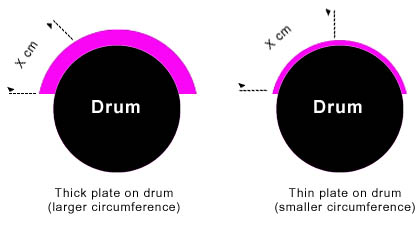
Flexo plates vary more in thickness than the plates that are used on regular platesetters. The degree of thickness variation can lead to a significant difference in the circumference of the plate when it is wrapped around the drum:

  • A thin flexo plate wrapped around the drum has a smaller circumference than that of a thick plate.
  • A thick flexo plate wrapped around the drum has a larger circumference than that of a thin plate.

The different circumferences can lead to image distortion—whereby an exposed image is smaller than the expected outcome.


Solution


To ensure that the exposed image is the same size as the expected outcome:

  1. Calculate the scale factor1 corresponding to the plate thickness, by either using the scale factor formula or by using the Automatic Scale Factor Calculator.
  2. Enter the scale factor into the Brisque® workstation.

1Scale Factor

Every plate thickness is assigned a unique scale factor (SF) derived from a mathematical formula. The scale factor, which is entered into the Brisque workstation, compensates for any image shrinkage caused by the different thickness of plates on the drum.


Calculating the scale factor with the scale factor formula

ThermoFlex Mid


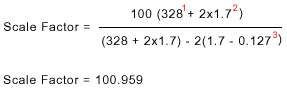
Perform the following calculation to work out the required scale factor compensation:

  • Scale factor = The figure entered into the Brisque workstation in order to compensate for image distortions. Accuracy is to the nearest thousandth decimal place.
  • Expose diameter = Drum diameter + (2x plate thickness)
    Note: On the ThermoFlex Mid flexograph, the drum diameter will remain constant at 328 (mm).
  • Soft thickness = Plate thickness subtracted from the polyester base thickness
    Note: On the ThermoFlex Mid flexograph, the polyester base thickness will remain constant at 0.127 (mm).

Example:


1 drum diameter, 2 plate thickness, 3 polyester base


ThermoFlex Narrow


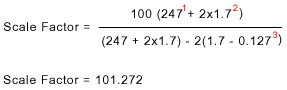
Perform the following calculation to work out the required scale factor compensation:

  • Scale factor = The figure entered into the Brisque workstation in order to compensate for image distortions. Accuracy is to the nearest thousandth decimal place.
  • Expose diameter = Drum diameter + (2x plate thickness)
    Note: On the ThermoFlex Narrow flexograph, the drum diameter will remain constant at 247 (mm).
  • Soft thickness = Plate thickness subtracted from the polyester base thickness
    Note: On the ThermoFlex Narrow flexograph, the polyester base thickness will remain constant at 0.127 (mm).

Example:


1 drum diameter, 2 plate thickness, 3 polyester base


Calculating the scale factor with the Automatic Scale Factor Calculator

The Automatic Scale Factor Calculator opens an Excel® spreadsheet, and automatically calculates the scale factor for any given plate thickness. In addition, the calculator enables you to view the size of the image without any scale factor compensation.


Technical contact(s)
 

Viki Arviv

Submitted by
 

Viki Arviv

Date submitted
 

08 Apr 2004


    Copyright © 2005 Creo Inc. All rights reserved. Confidential. Back to top.