Home | Contact Us | Submit Troubleshooting Info | Search | Help


    Output | Software Solutions | Proofing | Color, Screening and Calibration | Scanning | Digital Photography | Consumables | POS


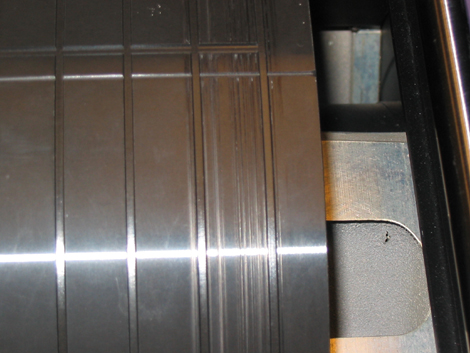
Grooves appear on the drum on ThermoFlex Mid and Narrow devices


Product

 
  • Kodak® ThermoFlex Mid® platesetter, all versions
  • ThermoFlex Narrow platesetter, all versions

Component


Drum


Symptoms


Grooves appear on the drum, as shown in the following photograph:


Cause

 
  • Before the Focus Calibration Test was performed, the nozzle was not moved as far away from the drum as possible.
  • The focus value set in the media definitions is not appropriate for the thickness of the media on the drum. During exposure, the focus assembly presses into the media, causing particles of media to stick together. The focus assembly presses these particles into the drum as the drum revolves, causing the groove.

Solution


Escalate this issue to Kodak Israel.

To prevent grooves from occuring on the drum:

  • Before performing the Focus Calibration Test, move the nozzle as far away from the drum as possible.
    In the registry, select LOTEMFLEXO\IO OBJECTS\Anti Collision System and change the Anti Collision System parameter value to 0 to disable it.
    Note: The focus stepper motor value is dependent on the plate type, so repeat this test for each plate type and thickness that the customer uses.
  • In the Media Definitions dialog box, make sure that the focus value is appropriate for the thickness of the media on the drum.

Technical contact(s)
 

Viki Arviv

Date submitted
 

18 Dec 2006


    Copyright © 2005 Creo Inc. All rights reserved. Confidential. Back to top.