Home | Contact Us | Submit Troubleshooting Info | Search | Help


    Output | Software Solutions | Proofing | Color, Screening and Calibration | Scanning | Digital Photography | Consumables | POS


With wide focus range, the image is foggy and shows artifacts, and the focus motor collides with the media on the drum on ThermoFlex Mid and Narrow


Product

 
  • ThermoFlex® Mid II
  • ThermoFlex Mid
  • ThermoFlex Narrow

Note: This procedure is relevant only for devices with the wide focus range.


Symptoms

 
  • The image is foggy.
  • Artifacts appear on the image.
  • The wide range focus motor collides with the media on the drum.

Cause


The Focus Motor Velocity [Steps/Sec] registry parameter value is not sufficient to move the focus motor to the required position.


Solution

 
  1. In the registry, select HKEY_LOCAL_MACHINE\SOFTWARE\SCITEX\ Projects\LotemFlexo\IO OBJECTS\LOCAL 3\STEPPERS and change the value of the Focus Motor Velocity [Steps/Sec] parameter from 5 to 18.
  2. Test repeatability, as described in the Test section.

Note: As a results of this change, the focus motor moves from home position to 5 mm (2 inch) position in 116 seconds, instead of 33 seconds (an 83-second difference).


Test


Test repeatability

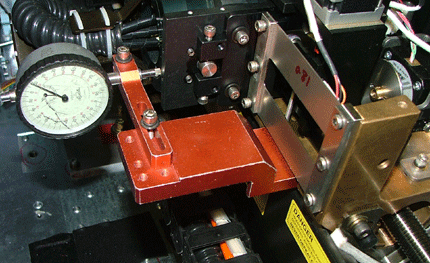
  1. Install the focus jig:
    • Narrow—First open the front door, insert a motor interlock cheater, and lift or remove the loading tray.
    • Mid—Open the rear door and insert a motor interlock cheater.
    • Mid II—Open the service door and insert a motor interlock cheater.
  2. In Controller, send the focus motor to HP.
  3. Set the focus dial jig to zero.
  4. In Controller, send the focus motor to 4000 and check the dial to verify that it shows 4000, with a tolerance of 10 microns.
  5. Repeat step 4 nine times to verify consistency.
    Note: If you do not obtain 4000 +/-10, you may need to replace the wide focus motor.

Technical contact(s)
 

Viki Arviv

Date submitted
 

19 Sep 2005


    Copyright © 2005 Creo Inc. All rights reserved. Confidential. Back to top.