Home | Contact Us | Submit Troubleshooting Info | Search | Help


    Output | Software Solutions | Proofing | Color, Screening and Calibration | Scanning | Digital Photography | Consumables | POS


Error message 5735: Coolant level is low on Magnus 400

.

Product

 
  • Magnus™ 400
  • Magnus 400 Xpose

Component

 
  • Flow tubes
  • CPC ports
  • LDA driver cable or connectors
  • LDA driver
  • Chiller

Error


5735


Cause


Coolant level is low due to a malfunction of one of the components listed earlier.


Solution


After each adjustment or part replacement, check whether the problem is resolved. If not, proceed to the next step.

  1. From Controller, open the front door.
  2. Exit Controller and turn off the platesetter.
  3. Open the left side door and the left panel.
  4. Check the coolant level on the chiller.
    • Below range—continue procedure.
    • Within range—proceed to step 6.
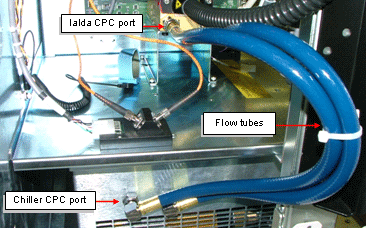
  5. Verify there is no leakage from the chiller, the flow tubes, or the CPC ports on the chiller and the LDA. Verify there is no leakage from the chiller, the flow tubes, or the CPC ports on the chiller. If there is leakage, report this to your service representative.

    • No leakage—proceed to step 6.
    • Leakage—determine the source of the leak. If one of the flow tubes or LDA CPC ports is the source of the leak, replace that tube or CPC port, and refill the chiller with coolant.
  6. Check the cable connection between the LDA driver and the chiller. Resolve any loose connections or replace the cable if required.
  7. If the problem persists, replace the LDA driver.
  8. If the problem persists, replace the chiller.

Technical contact(s)
 

Mario Amir

Submitted by
 

Shay Amsili

Date submitted
 

27 Feb 2005


    Copyright © 2005 Creo Inc. All rights reserved. Confidential. Back to top.