Home | Contact Us | Submit Troubleshooting Info | Search | Help


    Output | Software Solutions | Proofing | Color, Screening and Calibration | Scanning | Digital Photography | Consumables | POS


Replacing the alignment system detectors on the Magnus 800 platesetter


Product


Magnus 800 platesetter


Background


There are four strategically positioned home and away detectors on the alignment system:

  • Fixed registration pin home detector
  • Fixed registration pin away detector
  • Spring registration pin home detector
  • Spring registration pin away detector

This procedure describes how to remove and replace the alignment system detectors.


Procedure


Removing the alignment system detectors

  1. Obtain a punched plate from the customer. This plate will be used as a reference plate for testing the procedure.
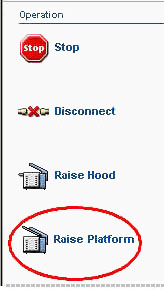
  2. In Magnus Controller, click Raise Platform to raise the platesetter loading platform:


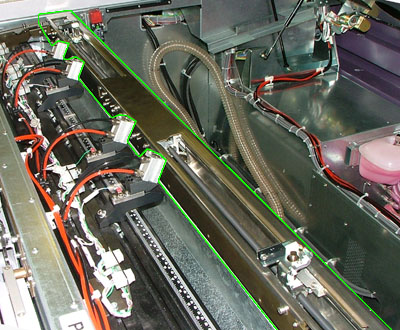
    The alignment system is located at the front of the platesetter:


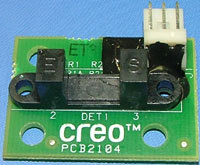
  3. There are four home and away detectors (part number 503-00187A) on the alignment system:


    Note: Use the image above to locate the four detectors on the alignment system. Keep in mind that you do not need to remove the alignment system to replace the detectors.

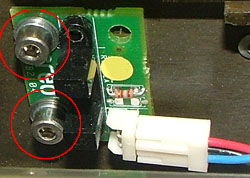
    Use a 3-mm hex key to remove the two screws securing the defective detector to the alignment system:


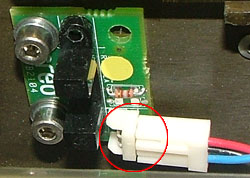
  4. Disconnect the connector from the defective detector:


Replacing the alignment system detectors

Important: Unless otherwise stated, coat all screws in Loctite® 242.

  1. Use a 3-mm hex key to insert and tighten the two screws securing the home and away detector to the alignment system. (View image)
  2. Connect the connector to the replacement detector. (View image)
  3. Manually close the loading platform.

Test


If you replaced the fixed registration pin home detector, see the Test procedure for replacing the alignment system.


Technical contact(s)
 

Content owner: Itai Peperovich
See the Escalation page for escalation contacts.

Date submitted
 

22 Feb 2005


    Copyright © 2005 Creo Inc. All rights reserved. Confidential. Back to top.