Home | Contact Us | Submit Troubleshooting Info | Search | Help


    Output | Software Solutions | Proofing | Color, Screening and Calibration | Scanning | Digital Photography | Consumables | POS


Connecting a Kodak T-series plate processor to a Magnus 800 platesetter


Product

 
  • Kodak® Magnus™ 800 platesetter
  • Kodak® T-series plate processor

Background


This procedure describes the following activities:


Requirements


CPG ready cable for Magnus (part number 90109114) – supplied with processor


Procedure


Connecting a T-series plate processor to a Magnus 800 platesetter

  1. Install the CPG ready cable for Magnus (part number 90109114):
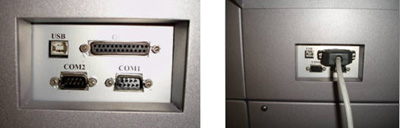
    1. Connect one end of the cable to the OP1 connector located on the T-series plate processor.
    2. Connect the opposing end of the cable to the MSB J14 connector located on the Magnus 800 platesetter.


  2. Define the CTP Interface parameter:
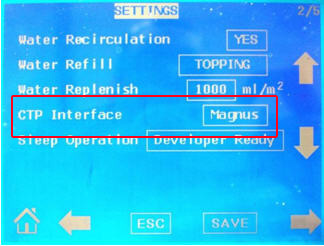
    1. On the processor’s touch screen, locate the MENU screen.
    2. From the MENU screen, locate the SETTINGS 2/5 screen.
    3. Define Magnus as the CTP Interface parameter.


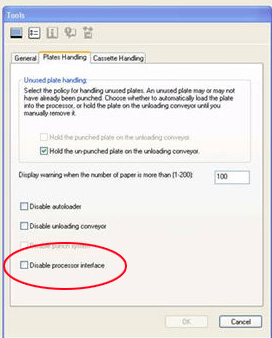
  3. In Magnus 800 Controller software, clear the Disable processor interface check box.
    1. In the Magnus 800 Controller software Mode pane, click Tools.
    2. In the Tools dialog box, click the Plates Handling tab.
    3. Make sure the Disable processor interface check box is cleared.

Interpreting processor related messages

The processor screen displays the status of the processor. Magnus 800 Controller software receives two signals from the processor and generates a corresponding message relating to the status of the processor signals, as described in the following table:

Processor
Platesetter
Status
Proc.
Signal 1
Proc.
Signal 2
Status Interpretation
Det. 1
Det. 2
READY
1
1
Processor can receive and process plates.
On
On
WARNING
1
0
Processor can receive and process plates. The Magnus 800 Controller software warns operator about impending maintenance.
On
Off
BUSY*/
NOT READY*
0
1
Processor cannot receive a plate because it is either warming up or working to maximum capacity.
Off
On
FAULT**
0
0
Processor cannot receive a plate. Requires operator intervention.
Off
Off

*When the processor displays BUSY/NOT READY, the following message appears in the Magnus 800 Controller software:

Busy: IDS_PROCESSOR_UNLOADING_CONTINUE_UNLOAD
Verify that the processor status is ready and able to receive a plate.
Click Continue or click Unload to automatically unload the plate from the unloading platform. If the problem persists, in the Operation panel click Stop. To continue working, you can disable the processor interface.

**When the processor displays FAULT, the following message appears in the Magnus 800 Controller software:

Error: IDS_PROCESSOR_UNLOADING_CONTINUE_REMOVE
Verify that the processor status is ready and able to receive a plate.
Click Continue or remove the plate manually from the unloading conveyor and click Media Removed.
If the problem persists, in the Operation panel click Stop. To continue working, you can disable the processor interface.


Technical contact(s)
 

Content owner: Yaron Shifman
See the Escalation page for escalation contacts.

Date submitted
 

30 Nov 2006


    Copyright © 2005 Creo Inc. All rights reserved. Confidential. Back to top.