Home | Contact Us | Submit Troubleshooting Info | Search | Help


    Output | Software Solutions | Proofing | Color, Screening and Calibration | Scanning | Digital Photography | Consumables | POS


Adjusting the position of the Magnus 800 platesetter drum in order to optimize the LEC opening


Product


Kodak Magnus 800 platesetter


Background


The leading edge clamp (LEC) secures the front edge of the plate to the drum. If the LEC opening is not at the optimum angle, plates may fail to load. This procedure describes how to adjust the position of the drum in order to optimize the LEC opening.


Procedure

 
  1. In Kodak Magnus Controller, open the loading platform.
  2. Open the left-side door and insert the bypass key into the bypass switch.
  3. Remove the upper-front panel.
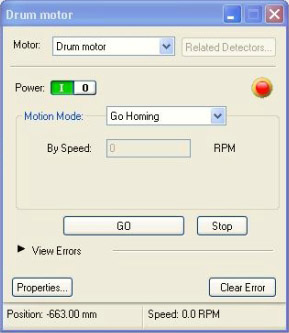
  4. In Magnus Controller, open the Drum motor dialog box, and send the drum motor to an absolute position of -662, at a speed of 10 mm per second.


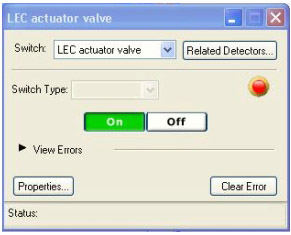
  5. Open the Hardware Tree. Locate the LEC actuator valve dialog box, and click On.


  6. On the platesetter, verify the following:
    1. LEC actuator bar descends.
    2. Bearings touch the LECs, causing them to open.
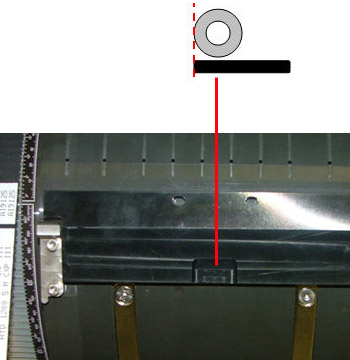
    3. LEC actuator bearings are located at the rear of the LEC assembly groove.

If the LEC actuator bearings are not located at the rear of the LEC assembly groove, then perform the following actions:

  1. In the LEC actuator valve dialog box, click Off.
  2. In the Drum motor dialog box, move the drum in 1-mm increments, at a speed of 10 mm per second, until the LEC actuator bearings are located at the rear of the LEC assembly groove.
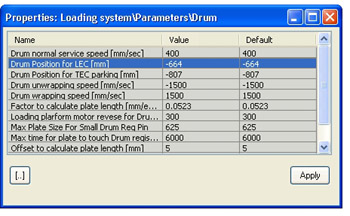
  3. Make a note of the drum absolute position and amend the value of the Drum position for LEC [mm] parameter.
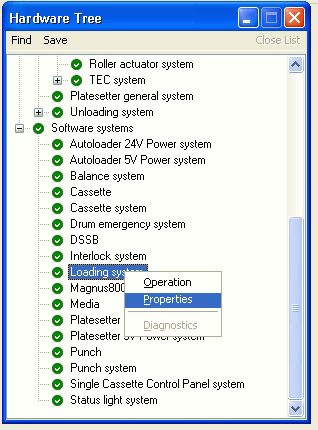
    (Service\Hardware Tree\Software systems\Loading system\ Properties\+Parameters\+Drum\Drum Position for LEC [mm] = -662.)


Technical contact(s)
 

Content owner: Nir Peleg
See the Escalation page for escalation contacts.

Date submitted
 

12 Oct 2006


    Copyright © 2005 Creo Inc. All rights reserved. Confidential. Back to top.