Home | Contact Us | Submit Troubleshooting Info | Search | Help


    Output | Software Solutions | Proofing | Color, Screening and Calibration | Scanning | Digital Photography | Consumables | POS


Replacing the unloading platform cylinder assembly on Magnus 800


Product


Magnus 800


Background


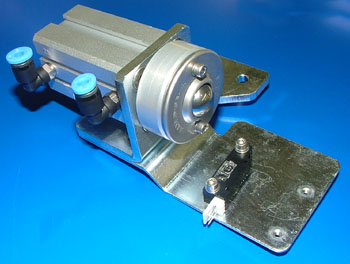
This procedure describes how to remove and replace the unloading platform cylinder assembly.

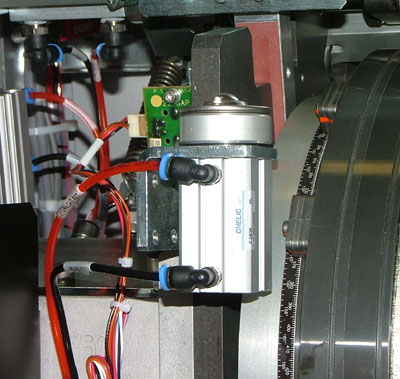
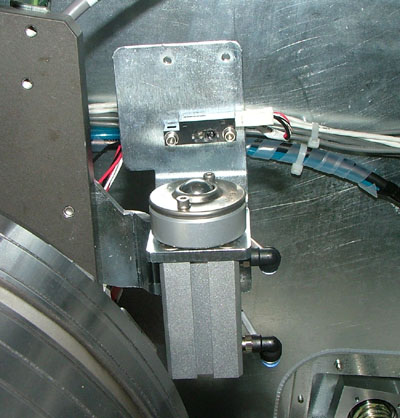
There are two unloading platform cylinder assemblies, one on each side of the optomech:


The two cylinders raise the unloading platform into the following positions:

  • Pre-unload position: Unloading platform is in its lower position.
  • Unload position: Unloading platform is in its upper position.

Procedure


Removing the unloading platform cylinder assembly

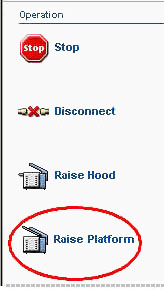
  1. In Magnus Controller click Raise Platform to raise the loading platform:


  2. Manually raise the unloading platform.
  3. Shut down the air supply leading to the platesetter.
  4. Disconnect the two air tubes connected to the cylinder:


  5. Disconnect the connector leading to the optical sensors. The connector is labeled Unload down:


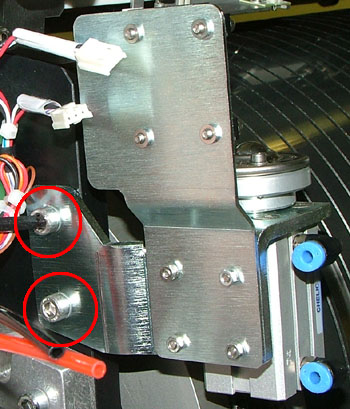
  6. Two screws secure the cylinder assembly to the optomech.
    Use a 5-mm hex key to remove the two screws:


Replacing the unloading platform cylinder assembly

  1. Place the cylinder assembly into its position inside the optomech.
  2. Use a 5-mm hex key and two screws to secure the assembly to the optomech.
  3. Connect the Unload down optical sensor connector to the lower optical sensor on the assembly.
  4. Insert the two air tubes into their relevant air holes on the cylinder. Insert the orange/red tube into the upper air hole. Insert the black tube into the lower air hole.
  5. Open the air supply leading to the platesetter
  6. In Magnus Controller, activate the unloading platform cylinders and check the following:
    • Cylinders operate smoothly and continuously.
    • Cylinders operate at the same speed.
    • Cylinders place the unloading platform at the required height.
  7. Close the unloading platform and the loading platform.

Test

 
  1. In Magnus Controller, activate the unloading platform cylinders and check the following:
    • Cylinders operate smoothly and continuously.
    • Cylinders operate at the same speed.
    • Cylinders place the unloading platform at the required height.
  2. Load and unload several plates of different size and thickness and make sure the process is running smoothly and continuously.

Technical contact(s)
 

Content owner: Yaron Shifman
See the Escalation page for escalation contacts.

Date submitted
 

16 Feb 2006


    Copyright © 2005 Creo Inc. All rights reserved. Confidential. Back to top.