Home | Contact Us | Submit Troubleshooting Info | Search | Help
Output | Software Solutions | Proofing | Color, Screening and Calibration | Scanning | Digital Photography | Consumables | POS
Home | Contact Us | Submit Troubleshooting Info | Search | Help
Output | Software Solutions | Proofing | Color, Screening and Calibration | Scanning | Digital Photography | Consumables | POS
Product |
Magnus® 800 |
||
Background |
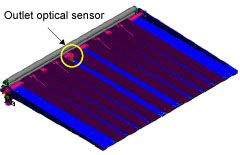
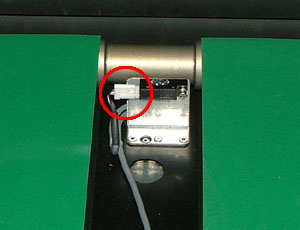
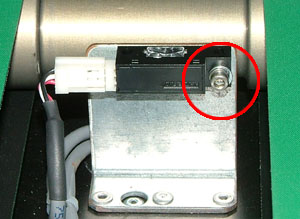
This procedure describes how to remove and replace the optical sensor for detecting plates on the unloading platform. The sensor is located at the rear edge of the unloading platform. This
optical sensor detects the location of the plate. When the plate has fully
left the platform, the sensor signals that the next plate can be unloaded
from the drum. |
||
Procedure |
Removing the unloading platform optical sensor
Replacing the unloading platform optical sensor
|
||
Test |
|
||
Technical contact(s) |
Content owner: Yaron Shifman |
||
Date submitted |
13 Jan 2005 |
||