Cause |
|
There are five known probable causes:
- The device does not have the adjustable LEC opening kit on the backbone or it is improperly adjusted.
- The electronic registration system has failed due to a bent probe. The pins can get bent when the device
has a fly off or a drum amplifier problem.
Note: The bent probe will cause the registration continuity failure because the probe cannot move out fast enough to
stay touching the contact on the contact block.
- The electronic registration system has failed for another reason.
Note: During a drum init when the LEC is opened, if the electronic plate registration system detects a registration
sensor pin [as opposed to drive pin] is in contact with a plate, then the system will give error #70736 - Registration monitor
hardware failure [always on]. The likely causes of this are the registration pins are very bent or the wiring is shorting
allowing the sensor pin to be powered as if a plate were present.
- The registration continuity leaf switch that detects the LEC is closed is incorrectly adjusted or malfunctioning.
Note: During a registration continuity check in a load cycle, if the LEC switch is detected in the wrong state, the
firmware will fail with hardware error #XXX36 registration monitor hardware failure [always on][always off].
- The plate has moved away from the registration pins during the LEC closing motion. The load table preload distance is
set too large and the plate could be too buckled to be able to touch the registration pins correctly during the LEC
closing. Or, the LEC opening is adjusted incorrectly. In order to troubleshoot this error, you need to look at the table
that service shell displays when closing the LEC on the plate. For example, display of the code as good and as bad.
As the LEC closes, the control system samples the registration pins to see that the plate is still in contact with them and
checks the registration continuity switch [on the backbone]. When the registration continuity switch changes state, the firmware considers the
LEC closed and then checks the entry previous to the last entry [in the table] to determine if the plate was still in contact with the
registration pins as the LEC finished closing. If the second last reading in the table is true then the engine proceeds; if the second
last entry is false, then the system retries 2 more times to clamp the plate. If the second retry does not work then error is set and the
system waits for a release or resume. |
Solution |
|
- Open the rear hood and the front hood and turn the hazard key to the mechanical hazard mode.
- Check if the adjustable LEC opening kit is installed and correctly adjusted. See Backbone Upgrade for Adjustable LEC Openings.
- Check if the registration continuity leaf switch is operating correctly.
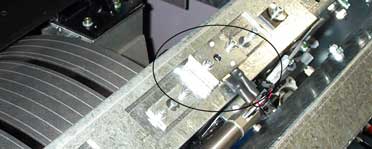
- Queue a plate load (single or dual - whichever one normally generates the error). Consider using load table
step enable and engine step enable to allow yourself time to see each step and answer the questions below.
- Watch the plate[s] as the load table preload is applied and when the LEC closes. As the plate is loaded and one of
the registration steps fail, the device will automatically try to do each step two more times before generating an
error; this may make the questions a little more difficult to answer.
Question 1: - As the preload is applied, what does the plate do before the LEC closes?
- The plate is not buckled between the vacuum cups and the LEC.
- The plate is buckled equally or more on one side than the other.
Question 2: - As the LEC closes, how does the plate move?
- The plate is moving as the LEC closes.
- The plate stays in position as the LEC closes.
Question 3: - As the LEC closes, what is the result of the registration in the continuity table?
- The table of registration values go from true to false then maybe back to true.
- When error #40735 occurs, check which sensor is included in the description (0, 1, or 2).
- If the plate is not buckled (question 1):
- Increase the preload value.
- Check the adjustable LEC opening.
- Check the operation of the LEC closed switch.
- Check the electronic registration system (see Appendix A).
- If the plate is buckled (question 1):
- The plates may not be making good contact with the registration pins.
Remove plates and rotate plates in cassette bay or on pullout load table during loading.
Reduce the preload value.
- Check the electronic registration system (see Appendix A).
- Reduce the preload value.
- If the plate is moving while the LEC closes (question 2):
- Reduce the preload value.
- If the plate is not moving while the LEC closes (question 2):
- Check the electronic registration system (see Appendix A).
- If the registration values go from true to false and back to true (question 3):
- Go to 6.1 and 6.2 and follow those suggestions.
Appendix A - Checking the electronic registration system.
To determine which pin circuit is causing the registration error, load several plates using the Continuous Load
(manual bypass) table and follow the instructions below.
Test option 1
- 6 pin registration system - load a large plate on pins 3 and 4.
- If a single plate centered on 697 mm pins is successful: Load plates on pins 1 and 3 , 4 and 6.
- If it fails on dual plates, look for the plate that is not generating registration (for home plate: check pins 1
and 2; for away plate: check pins 5 and 6).
- If it succeeds on dual plates, the electrical part of the registration system is working.
- If a single plate centered on 697 mm pins fails: Check pins 3 and 4
- 4 pin registration system - load a large plate on pins 3 and 4.
- If a single plate centered on 697 mm pins fails, load a medium plate on pins 1 and 3.
- If a single plate on 504 mm registration fails, load a small plate on pins 2 and 3.
- If a single plate on 280 mm registration fails, check all pins 1, 2, 3, and 4.
- If a single plate on 280 mm registration is successful, check pins 1 and 4.
- If a single plate on 504 mm registration is successful, check pin 1.
- If a single plate on 697 mm registration is successful, load 1 medium plate on pins 1& 3.
- If a single plate on 504 mm registration fails, check pin 2.
- If a single plate on 504 mm registration is successful, load 1 plate on pins 2 &3.
- If a single plate on 280 mm registration fails, check pin 3.
- If a single plate on 280 mm registration is successful, it would appear that the electrical part of the registration
system is working.
Test option 2
- Cut a piece of printing plate large enough to cover three contact on the contact block. Tape the piece of plate alum side up
onto the contact block over pins 1 to 3.
- Initialize the drum.
- If the device error on a detected short across pins 1-2 or 1-3 then you know that the electronic registration system for those
pins is working.
- Repeat for pins 4 to 6.
|

