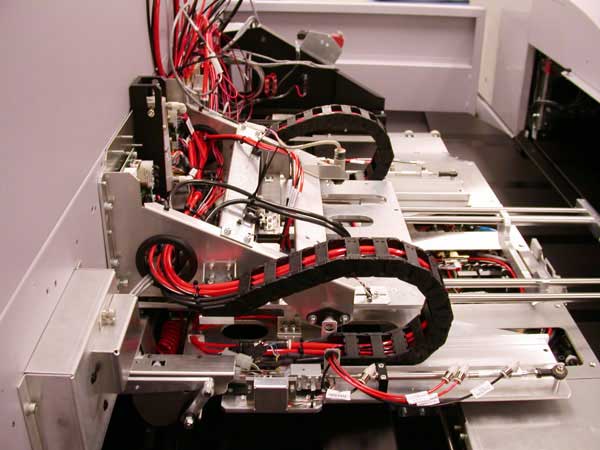
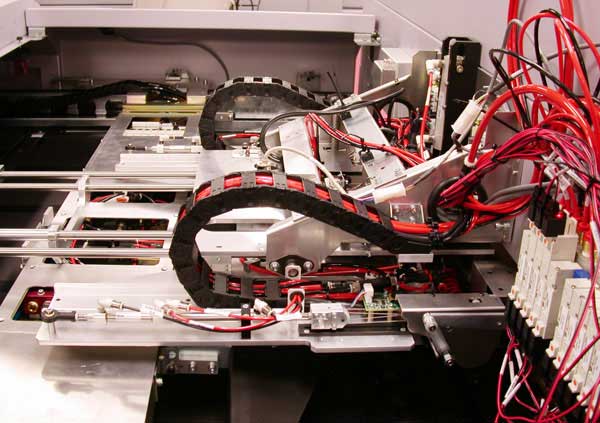
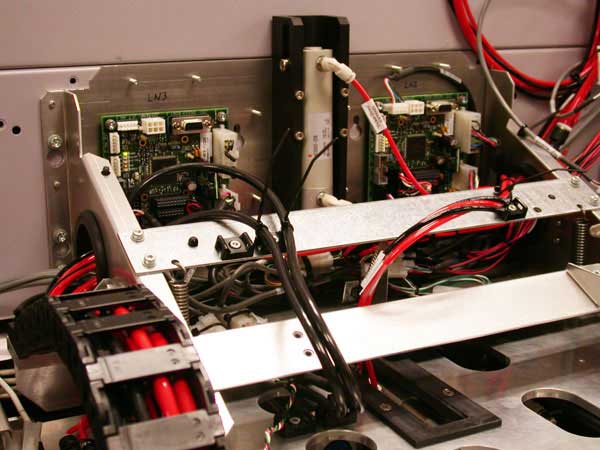
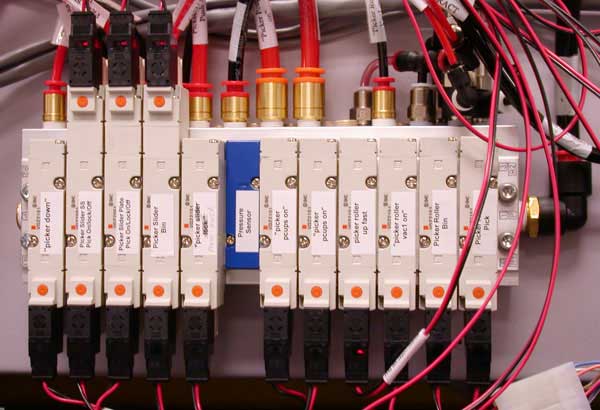
If the safety loop has been triggered, ensure that the picker is in a safe position before manually moving the MCU. The Delicate Media
(DM) picker will freeze in its current position and not retract to a safe position when the safety loop is triggered. Therefore, if the
DM picker stops inside the MCU and you move the MCU up or down with the manual “hold to run” buttons, you will damage the DM picker.
Description
The DM picker is designed to reduce surface scratches on plates that have a sensitive surface when the plates are moved from the MCU to the Magnus
VLF device for imaging. To accomplish this, the DM picker has the following new features:
The slipsheet is picked up and removed without crinkling it while it is on the plate.
When the slipsheet front edge is picked up, it is curled in order to lift the entire edge and not just where the roll bar is.
The curled edge is stiffer so it does not droop allowing the entire leading edge to lift at once.
The slipsheet is removed after the plate is removed and not in parallel as with the WedgeMaster.
There are few adjustments on the DM Picker (most things are bottomed out etc).
The DM picker can be driven to four subscan positions:
A safe or home position - called Picker Slider Home.
A forward position where the P-cups are positioned to pick up a plate - called Picker Slider Plate Pick.
A forward position where it can pick a slipsheet off the plate - called Picker Slider sspick.
A rear position where it can drop the slipsheet into the SSR - called Picker Slider ssbin.
In addition, the DM Picker can be pushed further into the MCU by the fetcher when it is picking a plate (springs in the DM Picker
return it once the fetcher has left).
The slipsheet picker roller can be driven to two different vertical positions:
A very low position for picking a slipsheet from the plate - called Picker Roller Down Pick.
An approximate half way down position for handing off the slipsheet to the SSR - called Picker Roller Down Bin. This position
does not go as low as the slipsheet pick position in order to prevent the slipsheet picker roller from getting caught in the SSR
rollers.
The batwing on the SSR now has four small rollers to keep the slipsheet flat when it is pulled into the SSR. This prevents
wrinkles getting created that will extent over the plate and scratch it as the slipsheet is removed.
The link pivots are very sloppy and have a lot of clearance. This allows the slipsheet picker roller to conform to the plate
stack and not bind.
The slipsheet picker roller now has slots that allow vertical movement so that the slipsheet picker roller can conform to the
plate stack and not bind.
Each end of the slipsheet picker roller is lowered and raised using two cables in a shallow V-pattern to prevent the roller
from swinging as it is raised or lowered (which would scuff the plate). This is required due to the large height it must be lowered
from in the Magnus VLF.
In addition to measuring the plate’s front edge position on the fetcher deck, the plate width sensor is now also used to
improve throughput. The sensor tells the firmware when the plate’s far edge has passed the plenum thereby allowing the picker to
start on its next pick—it does not need to wait for the fetcher to stop on the load table before starting the next pick.
The P-cup’s air supply lines are coiled to prevent the tube stiffness from deflecting the P-cup as it first engages the
plate—a tilted P-cup will scratch the plate if it touches it.
There are two air jets (Plate Push Jets) located directly above the fetcher’s vacuum cups (V-cups). These two jets help push
the plate down so the vacuum cups can grab it reliably.
There are two air jets (Fetcher Air Jets) on the fetcher that blow low velocity air between the plate and the slipsheet to
help separate them at their far end. This air hugs the underside of the plate thereby not upsetting the front edge of the slipsheet.
Some of the air cylinders have non-rotating rods so that the air fittings cannot rotate around and get caught on things.
This is a high level overview only. For a more detailed sequence of operation, see the firmware sequence list. The sequence of operation
shown below is for picking of dual plates.
Start of the plate pick sequence
The picker moves into the MCU to pick a plate.
The P-cups turn on and drop.
The P-cups grab the plate and rise. The plate separator air jets blow at the plate edges to separate the plates, but turn off
after the P-cups start to rise so that they do not blow back the slipsheet and do not puff up the plates too much and cause the
plate to strike the slipsheet picker roller (the bar that picks slipsheets).
The fetcher pushes in the picker against the picker’s return spring force.
The P-cups turn off, the plate push air jets come on, and the fetcher’s V-cups turn on and rise to grab the plate.
The fetcher’s V-cups drop and the plate push air jets turn off.
The fetcher air jets turn on and the fetcher moves the plate to the load table. The fetcher air jets are used to separate the
tail end of the plate from the slipsheet, and to lubricate the plate as it drags over the slipsheet so it does not drag it forward.
These air jets turn off after the fetcher passes the plenum. Once the plate’s tail is clear of the picker’s plate width sensor,
the slipsheet picking sequence can start (it does not wait for the fetcher to stop on the load table before doing the next action
with the picker).
Start of the slipsheet pick sequence
The picker moves into the MCU to pick the next slipsheet.
The slipsheet picker roller lowers onto the slipsheet (>>picker roller down pick).
The slipsheet picker roller vacuum cups turn on and it rolls forward to its away position.
The slipsheet picker roller rolls back to its original position (home position) and rises—the slipsheet edge is now curled
and rises as one full edge without any droopy corners touching the plate below it.
The slipsheet picker roller rises slowly. When it is part way up, another valve energizes and the roll bar rises faster.
The picker moves to the SSR handoff subscan position (>>Picker Slider ssbin).
The slipsheet picker roller drops to the SSR handoff vertical position (>>Picker Roller Down Bin).
The slipsheet picker roller vacuum cups turn off so that the slipsheet edge snaps down over the SSR roller.
The four small rollers on the batwing close to pin the slipsheet between themselves and the SSR roller.
The slipsheet picker roller rises quickly by energizing a valve that bypasses the orifices that normally feed the air cylinder.
The SSR rollers turn on to pull in the slipsheet and run for a calculated amount of time based on the length of the plate in
firmware for that bay.
Type >>set mhmedia # - to see the following parameters:
SeparatorPulseInterval this is the interval time between the start of each pulse measured in mSec.
SeparatorPulseDutyCycle - this is the length of time the separator is on measured in mSec (should be less than the interval time).
PickerMotionCountSeparatorOn – this parameter controls when the pulsing begins (should never be less than 1).
PickerMotionCountSeparatorOff – this parameter controls when the pulsing ends.
Ssdropdelay this is the delay after the picker reaches the up position to wait for the slipsheet to fall.
The default separator settings should be:
SeparatorPulseInterval = 0
SeparatorPulseDutyCycle = 0
PickerMotionCountSeparatorOn = 1
PickerMotionCountSeparatorOff = 8
Ssdropdelay = 0
If there are problems picking the last plate in a bay due to it falling off the pcups, then change the separator settings to:
SeparatorPulseInterval = 1200
SeparatorPulseDutyCycle = 1000
PickerMotionCountSeparatorOn = 1
PickerMotionCountSeparatorOff = 8
Ssdropdelay = 0
If the problems persists, decrease the SeparatorPulseDutyCycle and/or increase the SeparatorPulseInterval.
If there are problems with the slipsheet sticking to the underside of the plate:
SeparatorPulseInterval = 1200
SeparatorPulseDutyCycle = 1000
PickerMotionCountSeparatorOn = 1
PickerMotionCountSeparatorOff = 8
Ssdropdelay = 5
If the problem persists, increase the ssdropdelay. You can also increase the number of separator pulses by decreasing the
SeparatorPulseDutyCycle and SeparatorPulseInterval.