Home | Contact Us | Submit Troubleshooting Info | Search | Help
Output | Software Solutions | Proofing | Color, Screening and Calibration | Scanning | Digital Photography | Consumables | POS
Home | Contact Us | Submit Troubleshooting Info | Search | Help
Output | Software Solutions | Proofing | Color, Screening and Calibration | Scanning | Digital Photography | Consumables | POS
|
|
|||
Product |
|
||
Operating system |
Microsoft® Windows® XP |
||
|
|
|||
Background |
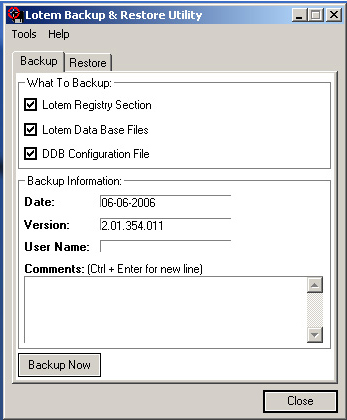
The ThermoFlex backup utility provides a fast and easy way to save the registry and database onto a disk. This utility is installed together with the ThermoFlex Controller software on the ThermoFlex Controller PC desktop. This procedure describes how to use the utility. Note: If you need to create an image DVD, see Backing Up Drive C or Entire Hard Disk Using the Backup and Restore Tool. This backup and restore tool contains any required licensing information and allows you to bypass the need to reinstall the license. |
||
|
|
|||
Procedure |
|
||
Technical contact(s) |
Content owner: Viki Arviv |
||
Date submitted |
03 Dec 2006 |
||