Home | Contact Us | Submit Troubleshooting Info | Search | Help
Output | Software Solutions | Proofing | Color, Screening and Calibration | Scanning | Digital Photography | Consumables | POS
Home | Contact Us | Submit Troubleshooting Info | Search | Help
Output | Software Solutions | Proofing | Color, Screening and Calibration | Scanning | Digital Photography | Consumables | POS
| Applies to | Trendsetter VLF Autoloader | Priority =Next Visit
Reason = Reliability Release date = Oct 2001 |
|
Machines affected |
All machines | |
|---|---|---|
|
Component |
New Regulator | |
| Problem | Regulator not stable. | |
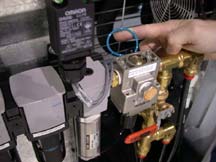
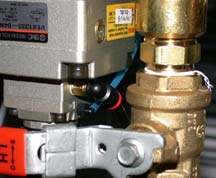
| Solution(s) | Add a small hose to stabilize the regulator. This changes the natural frequency of the regulator allowing the 'cal pressure' routine to be successful and consistent. | |
| Parts needed | Kit 05-2031 | |
| Tools needed | n/a | |
| Procedure | Installation:
|
|
| Technical contact | Angus Gillon | |