

Home | Contact Us | Submit Troubleshooting Info | Search | Help
Output | Software Solutions | Proofing | Color, Screening and Calibration | Scanning | Digital Photography | Consumables | POS
Home | Contact Us | Submit Troubleshooting Info | Search | Help
Output | Software Solutions | Proofing | Color, Screening and Calibration | Scanning | Digital Photography | Consumables | POS
Product |
Creo Feature Licensing |
||
Component |
|||
Error |
 |
||
Symptoms |
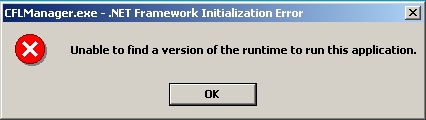
CFL Manager or Service Dongle Manager will not run due to an exception error. | ||
Cause |
Microsoft® .NET Framework is corrupted after installing .NET Framework 2.0. |
||
Solution |
|
||
See also |
|||
Technical contact(s) |
|||
Submitted by |
|||
Date submitted |
30 Jul 2007 |
||