Home | Contact Us | Submit Troubleshooting Info | Search | Help
Output | Software Solutions | Proofing | Color, Screening and Calibration | Scanning | Digital Photography | Consumables | POS
Home | Contact Us | Submit Troubleshooting Info | Search | Help
Output | Software Solutions | Proofing | Color, Screening and Calibration | Scanning | Digital Photography | Consumables | POS
When to run this script | Graphs | Data | Interpretation
This script measures the contrast ratio of the light valve (off-light over on-light) using the beam balance sensor, as the hvtrim is incremented from 65V to 80V. Your system must be properly configured before running this script. For more information, see Note 1 .
Use this script to diagnose beam balance failures, banding and as part of preventative maintenance.
Before you run ContvHV.spt, you must run Contrvbp.spt and the select the correct beamposition setting.
All the graphs have the High Voltage as the x-axis.
| Name | Description |
| ContOnOffvHV | This graph shows the contrast ratio, in percent, the pixel on power, in Watts, and the pixel off power, in Watts. |
| ContOnOffvHV_FIXED | This is the ContOnOffvHV graph with the same vertical axis range as all the other FIXED graphs. |
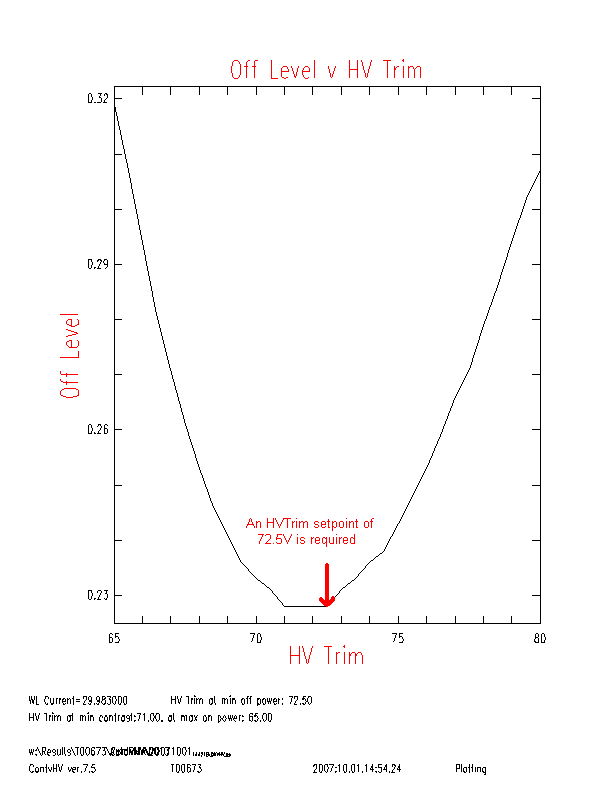
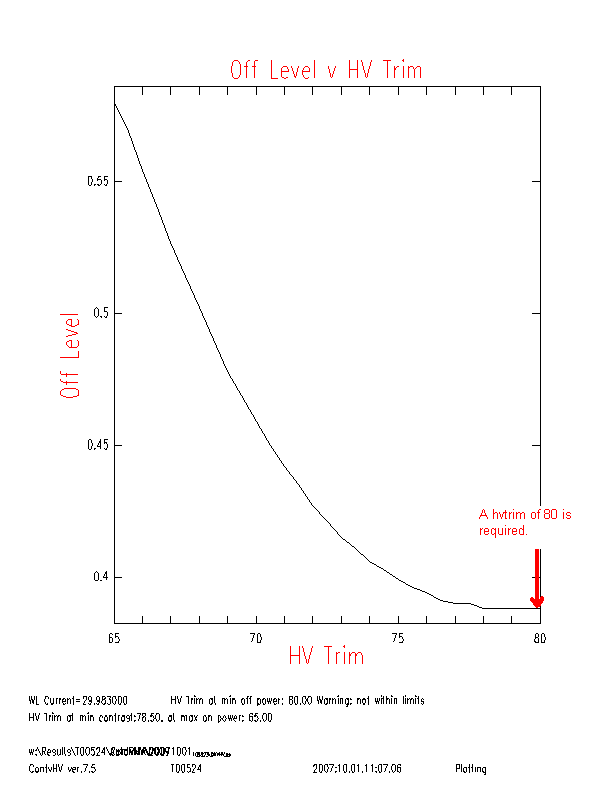
| OffvHV | This graph shows the write laser power with all pixels off, in Watts. |
| OffvHV_FIXED | This is the OffvHV graph with the same vertical axis range as all the other FIXED graphs. |
| OnvHV | This graph shows the write laser power with all pixels on, in Watts. |
| OnvHV_FIXED | This is the OnvHV graph with the same vertical axis range as all the other FIXED graphs. |
| ContvHV | This graph shows the contrast ratio, in percent. |
The LVD HVTrim parameter should be set for the minimum Off in the OffvHV graph.
This script produces one data file, ContvHV_data.txt. This file has four columns: