|
Product |
|
Trendsetter NEWS
|
|
Background |
|
Use this procedure to replace the registration blocks on TS NEWS devices when:
- Damage is caused to the existing registration blocks by careless removal/installation of a leading edge clamp (LEC)
- Plate registration errors occur due to an accumulation of aluminum oxide on the face of the stainless steel registration blocks.
|
|
Requirements |
|
Registration block replacement kit |
|
Procedure |
|
- Shut down the device and separate it from the loader if necessary.
- Remove the leading edge clamps (LECs) as described in Replacing the Leading Edge Clamps. This
exposes the four registration blocks.
- Remove the four registration blocks and the insulation strips between the blocks and the drum.
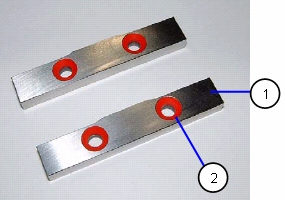
- Install eight mounting insulators (part number 57-9594A) into the four registration blocks.
 |
Registration block (57-9472A: blocks 1 &4;
58-0548A: blocks 2 & 3) |
|
 |
Registration block mounting insulators |
|
| |
|
|
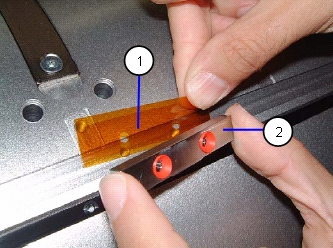
- Ensure the Kapton insulators are lined up to the threaded holes in the
drum.
| |
Kapton insulator (isolates the electrical conductivity between the registration blocks and the drum) |
|
| |
Registration block |
|
| |
|
|
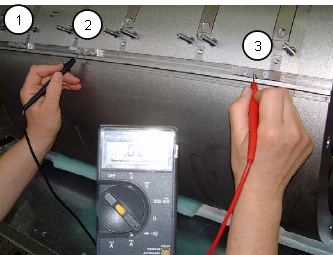
- Use a multimeter to ensure there is no electrical contact between the drum surface and the registration blocks.
| |
Registration block 2 (from away side) |
|
| |
Registration block 3 (from away side) |
|
 |
Registration block 4 (from away side) |
|
| Check: |
Results should be: |
| Block 1 and block 2 |
No continuity |
| Block 1 and block 3 |
No continuity |
| Block 1 and pin 4 |
No continuity |
| Block 2 and block 3 |
No continuity |
| Block 2 and block 4 |
No continuity |
| Block 3 and block 4 |
No continuity |
| screw head to screw head |
Continuity |
| Registration block to screw head |
No continuity |
| registration pin to drum surface |
No continuity |
- Reinstall the LECs you removed in step 2, as described in
Replacing the Leading Edge Clamps.
- Turn on the device.
|
|
Date submitted |
|
21 Nov 2005 |

