
Home | Contact Us | Submit Troubleshooting Info | Search | Help


    Output | Software Solutions | Proofing | Color, Screening and Calibration | Scanning | Digital Photography | Consumables | POS


Maintaining the contrast ratio on a Thermal 2 head when stroke profile is poor


Product

  Thermal 2

Machines affected


All devices with a Thermal 2.X head


Error


You may see the following error messages:

  • [00216] Beam-balance prevented by the range of pulse heights
  • [00218] Beam-balance error exceeds the maximum error

Symptoms

 
  • Poor contrast ratio, particularly because the off-light levels are too high
  • When you run BeamBalance.spt, the value for max correction is high (that is, the value is over approximately 175)

Accompanied by:

  • Long laser on hours (typically greater than 1000)
  • Banding
  • Poor stroke profile
  • Poor contrast

Cause


After 1000–2000 laser hours, the characteristics of the light valve change and therefore the voltage setting may no longer be valid. Adjusting hvtrim may improve the stroke profile.


Solution


Note: When solving banding problems on a TH2 head, you should first optimize the hvtrim (this drives the light valve). Next, run ContvBP.spt to either confirm that bpd beamposition is 0 or to pick the new beam position value.

  1. Reset the value of bpd beamposition to 0.
  2. Run ContvHVtrim.spt (contrast vs HVtrim). When the script prompts you for a laser power value:
    • If the customer only uses one media type, use the laser power for that media.
    • If the customer uses more than one media type, pick a laser power value that is an average for the media that they run.
  3. Look at the third graph (offvHV) and select the value at the lowest point (the bottom of the curve).
  4. Apply the new value using the command
    th2>set lvd hvtrim xx.x
    Note: This is the voltage that drives the light valve.
  5. Run ContvBP.spt (contrast vs beam position) to confirm that the beam position with the lowest contrast ratio is 0.
  6. Check the media setup (for example, sd, power, slope and curve).

Sample graph: In this example, the value to use is 71 volts.
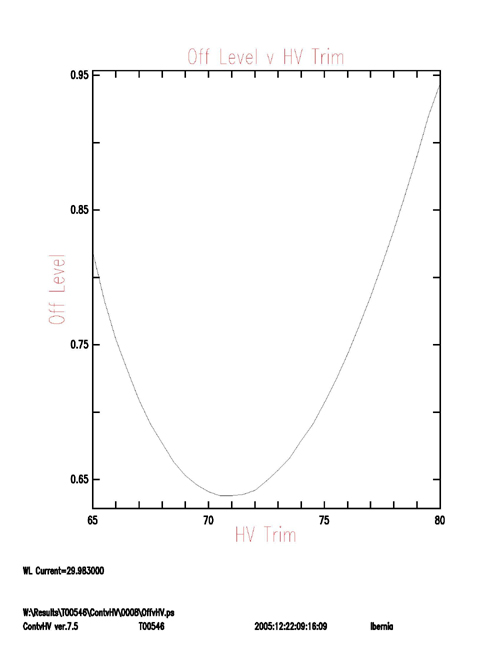
Sample graph, OffVhvtrim

See also


Thermal 2 Planned Maintenance


Technical contact(s)
 

Doug Jeffery

Submitted by
 

Doug Jeffery

Date submitted
 

16 Jan 2006


    Copyright © 2005 Creo Inc. All rights reserved. Confidential. Back to top.