Home | Contact Us | Submit Troubleshooting Info | Search | Help
Output | Software Solutions | Proofing | Color, Screening and Calibration | Scanning | Digital Photography | Consumables | POS
Home | Contact Us | Submit Troubleshooting Info | Search | Help
Output | Software Solutions | Proofing | Color, Screening and Calibration | Scanning | Digital Photography | Consumables | POS
Ripro Backup (Legato) TIC - Installation Guide
Previous Page | ToC | Next Page
Networker Installation and Configuration
Labelling the Media
 |
Relabeling a volume destroys all records of its contents under the old label. |
In case of a system crash and a new Legato installation is performed, new ecassettes must be labeled differently from already used cassettes, those labeled before the crash.
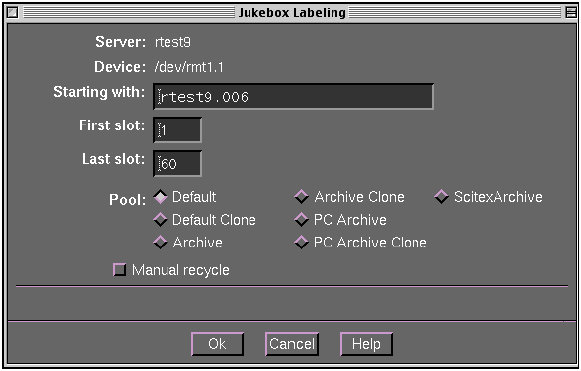
The default label template is used to label backup volumes loaded in the jukebox.
During the labeling process, a progress message appears in the dialog box. The time duration varies according to the drive speed.
At the end a notice appears:
Finished Labeling Volumes
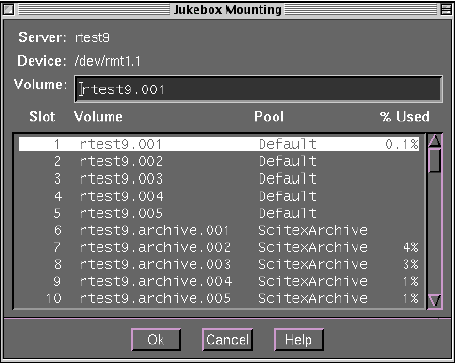
The Jukebox Mounting dialog window opens displaying the labeled cartridges including the cleaning cartridge (and number of cleaning periods left before replacement).
- During the labeling process, the cartridges are entered into the database inventory.
- On the Volumes window, check proper cartridges’ labeling and definition.
 |
If the cartridges have been used previously
by other software, the contents must be
erased before use with NetWorker.
To erase the cartridge contents:
Repeat this process on all used cartridges. |
Single Cartridge Magnetic Tape (DLT4000 or 7000)
To use the backup volume for recovering or backing up files, it must first be labeled and mounted.
The Label dialog window is displayed.
“Verifying media label...” appears in the Volume Name text field. Wait for this message to disappear.
The Volume name text entry field displays the name of the volume currently mounted in the drive, if it is named, otherwise it remains blank.
This is the end of the Installation procedure. Continue with Customizing Setup for customization instructions.