

Home | Contact Us | Submit Troubleshooting Info | Search | Help
Output | Software Solutions | Proofing | Color, Screening and Calibration | Scanning | Digital Photography | Consumables | POS
Home | Contact Us | Submit Troubleshooting Info | Search | Help
Output | Software Solutions | Proofing | Color, Screening and Calibration | Scanning | Digital Photography | Consumables | POS
Troubleshooting Information |Service call escalation process | Contacts: US&C : EAMER : INSEAN : GCR : CJP : PD | See also
Please gather this information prior to escalating the issue:
| What to Do | How to do it | |
|---|---|---|
| 1 | Record the serial number of the server and customer site ID. | System number: Evo xxx Customer: xxxxxxxxx |
| 2 | Run an error report from the Prinergy Evo
Server. Note: The error reporter gathers files together in a ZIP archive that will help Creo diagnose the problem. There are two types of archives: a snapshot of the general system state or information related to a specific process. The general archive gathers general information about the Evo computer & software; the process specific archive gathers information about a particular process. |
Using the Prinergy Evo Administrator, under the Tools tab, click the Report Errors button.
Check the Prinergy Evo Administrator online help for details on running the "Report Errors" utility. NOTE: "Report Errors" was internally called "BugMaster". |
| 3 | Send the BugMaster Archive to the next point of escalation | Error report archives do contain all the files in questions and can be quite large. Please call the person to whom you are planning to send the archive. |
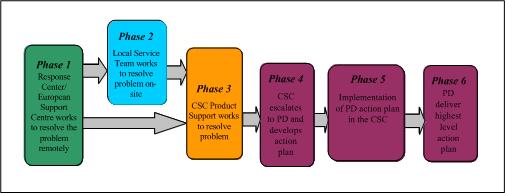
The escalation procedure for Prinergy Evo follows the Creo Customer Support customer call flow:
| Genalyn Canela | Escalation Manager | Local 2445 Mobile phone: 630-240-8345 (Chicago) |
| Mishon Eberly | Field Product Specialist (FPS) | Local 5552 Mobile phone: 717-371-9322 (New Jersey) |
| Richard Boyer | Field Product Specialist (FPS) | Local 2188 Mobile phone: 512-632-7330 (Atlanta) |
| Chris Joughin | Second-Level Support Specialist (RC2) | Local 2881 Mobile phone: 604-763-3516 (Vancouver) |
| Peter White | Second-Level Support Specialist (RC2) | Local 5971 Mobile phone: 604-765-1294 (Vancouver) |
| Leonardo Rodrigues | Second-Level Support Specialist (RC2) | Local 6275 Mobile phone: 604-889-1261 (Vancouver) |
| Jammi Mistry | Product Support Manager (PSM) | Local: 6092
Mobile phone: 44-7971-098016 |
| Carine Gijbels | PSS Imposition and Packaging Apps Workflow | Local: 2558
Mobile phone: 32-497-51 2558 |
| Sven Smet | Front End Product Specialist | Local: 2595
Mobile phone: 32-497-51 2595 |
| Steve Davis | Product Support Manager | Direct Line:613-8417-8155 Mobile: 614-1757-4886 |
| Chris Mussell | Primary Support Specialist | Direct Line: 643-385-9337 Mobile:642-1415-810 |
| Steve Withers | Secondary Support Specialist | Direct Line: 613-5282-5437 Mobile: 614-0833-4468 |
| Steve Davis | Product Support Manager | Direct Line:613-8417-8155 Mobile: 614-1757-4886 |
| Ferry Wang | Primary Support Specialist (PSS) | Direct Line: 862-1641-56606 Mobile: 861-3816-687912 |
| Megan Xu | Secondary Support Specialist | Direct Line: 862-1588-41499 Mobile: 861-3311-665869 |
| Kenichi Uchino | CJP PSSG Team Lead | 81-3-5259-9778 |
| Junko Hamada | Product Support Specialist (PSS) | 81-3-5259-9387 |
| Paul Roscow | CJP-Senior Technical Manager | Local: 4689 Mobile phone: 604-761-5227 (Vancouver) |
| John Ward | Product Line Manager | Local 5460 Mobile phone 604-760-7494 |
| Simon Chen | Project Manager | Local 2665
Mobile phone 604-318-5876 |
| Josh Garrett | Product Support Manager (PSM) | Local 5830 Mobile phone 604-761-1376 |
| Ian Robbins | Product Support Specialist (PSS) | Local 5163 Mobile phone: 604-417-3210 |
| Richard Tunstall | Subject Matter Expert | Local 5229 |
|
Note: Once the problem has been solved, share the wealth! Submit details about the problem and solution using the Submit Info link at the top of this page.