Home | Contact Us | Submit Troubleshooting Info | Search | Help
Output | Software Solutions | Proofing | Color, Screening and Calibration | Scanning | Digital Photography | Consumables | POS
Home | Contact Us | Submit Troubleshooting Info | Search | Help
Output | Software Solutions | Proofing | Color, Screening and Calibration | Scanning | Digital Photography | Consumables | POS
Diagram | Supported Devices | Documentation | Compatible Versions | Known Issues | Unknown Issues | Contacts/Escalation | Previous Configuration(s)
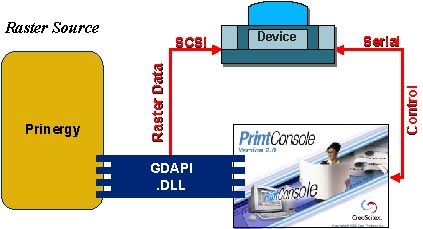
For plate-making devices, a direct connection via the GDAPI in Print Console and Prinergy is the recommended configuration, though you can also submit one-bit TIFF files via the TIFF Downloader (see Prinergy TIFF). Introduced in Print Console 2.0, the GDAPI (Generic Device Application Interface) is an internal component of Print Console that allows you to submit raster images, with the job properties defined in the RIP software (Prinergy), directly to Print Console.