Home | Contact Us | Submit Troubleshooting Info | Search | Help
Output | Software Solutions | Proofing | Color, Screening and Calibration | Scanning | Digital Photography | Consumables | POS
Home | Contact Us | Submit Troubleshooting Info | Search | Help
Output | Software Solutions | Proofing | Color, Screening and Calibration | Scanning | Digital Photography | Consumables | POS
Diagram | Supported Devices | Documentation | Compatible Versions | Known Issues | Unknown Issues | Contacts/Escalation | Previous Configuration(s)
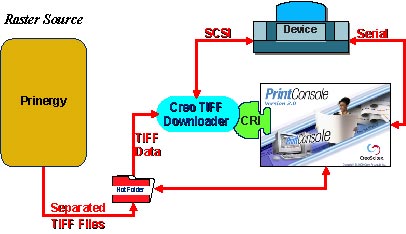
Due to a Prinergy limitation, support for a direct (GDAPI) connection via Print Console is not currently available for proofing devices. All proofing devices must use the Prinergy via TIFF connection, which means submitting TIFF files to the device via Print Console's TIFF Downloader. Although this TIFF option is supported for all devices, we recommend using the direct connection via GDAPI for better performance on all non-proofing devices. See also Prinergy via GDAPI for details.