

Home | Contact Us | Submit Troubleshooting Info | Search | Help
Output | Software Solutions | Proofing | Color, Screening and Calibration | Scanning | Digital Photography | Consumables | POS
Home | Contact Us | Submit Troubleshooting Info | Search | Help
Output | Software Solutions | Proofing | Color, Screening and Calibration | Scanning | Digital Photography | Consumables | POS
Dolev 800/800V/800V² TIC - Installation
Unpacking
Before You Start
Cautions
Unpacking Checklist
How to Unpack
Check that the shipping packing is undamaged. Do not proceed with the installation if it is damaged in any way.
Before you unpack and install the Dolev 800, make sure the unpacking site is large enough to allow easy lifting and maneuvering of the imagesetter. Refer to Figure for the Dolev 800 outline dimensions. The measurements in the drawing are in millimeters and (inches).
Note: If the packing materials are intended for re-use, be careful not to damage them when unpacking.
The Dolev 800 imagesetter includes these items:
Remove the Wrapping
Remove the Service Doors
Remove
the Imagesetter from the Pallet
Move
the Imagesetter with a Forklift
Move
the Imagesetter without a Forklift
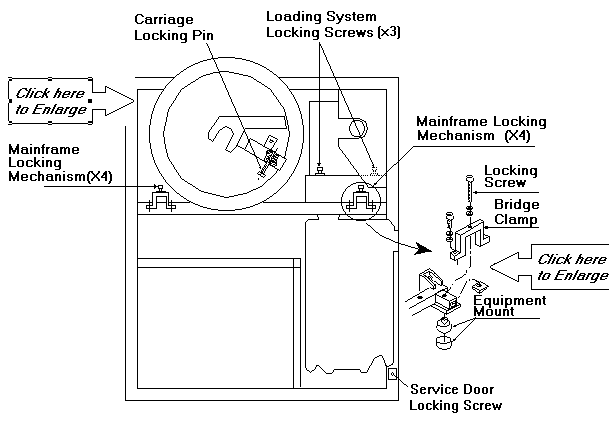
Remove the left and right service doors. The doors are screwed shut from the inside of the main frame. To open the service doors, open the unloading door and remove the output cassette.
For each door, locate the Allen locking screw, approximately 10 cm from the bottom of the main frame.
Release the screw. Open each door. Lift each door off of the
frame and put it
in a safe place.
Remove the Imagesetter from the Pallet
Locate and remove the four bolts (including washers, springs, and nuts) that secure the imagesetter to the pallet.
Move the Imagesetter with a Forklift
Moving the Dolev 800 with a Forklift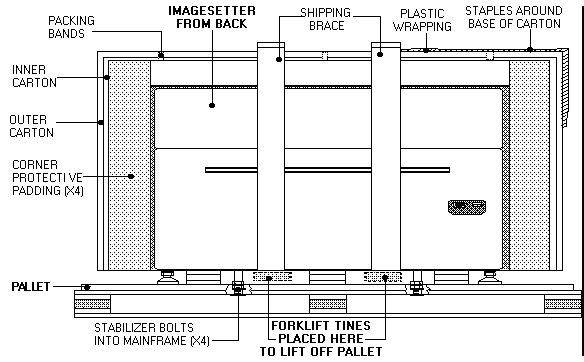
Move the Imagesetter without a Forklift
Installing the Dolev 800 without a Forklift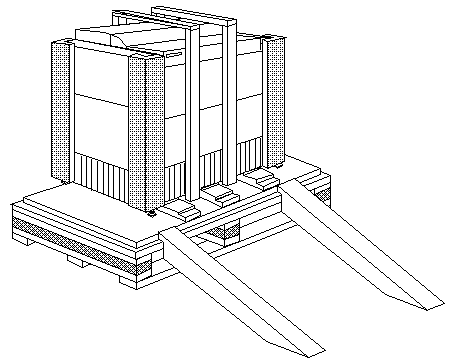
Caution: Exercise extreme caution when removing the machine from the pallet. The machine weighs more than 500 kg.
A minimum of three engineers is required to lower the imagesetter from the pallet. The first step is to lift the imagesetter off of the shipping pallet planks located under the machine.
The shipping crate includes two graded unloading planks. The planks are used to roll the machine off of the pallet.
Remember: The machine weighs more than 500 kg.
One engineer stands to the front left of the machine. A second engineer stands to the front right of the machine. A third engineer stands behind the machine.