Home | Contact Us | Submit Troubleshooting Info | Search | Help
Output | Software Solutions | Proofing | Color, Screening and Calibration | Scanning | Digital Photography | Consumables | POS
Home | Contact Us | Submit Troubleshooting Info | Search | Help
Output | Software Solutions | Proofing | Color, Screening and Calibration | Scanning | Digital Photography | Consumables | POS
|
|
|||
Product |
Lotem® 400 platesetter |
||
|
|
|||
Symptoms |
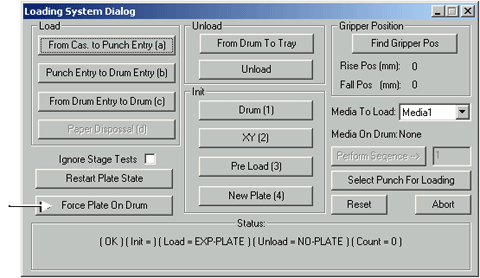
Plate exposure and unload fail. | ||
|
|
|||
Cause |
Pressing Restart Plate State resets the plate status to No plate on drum. If there is a plate on the drum, you cannot restart the plate state, and you cannot expose or unload the plate. |
||
|
|
|||
Solution |
|
||
|
|
|||
See also |
|||
|
|
|||
Technical contact(s) |
|||
Submitted by |
|||
Date submitted |
16 Mar 2004 |
||