The objective of the Focus test is to find the focus
stepper motor value that brings the beams' focus to coincide with the plate surface. The
focus stepper motor value depends on the type of plate, therefore, this test should be
repeated for different plate types. It is recommended to perform the test for each plate
type and plate thickness the customer intends to use.
Load the plate you intend to use for this test.
From the BrisqueLaunch pad, or from the Setup
panel, double click the Calibration icon; the Lotem calibration window
opens.
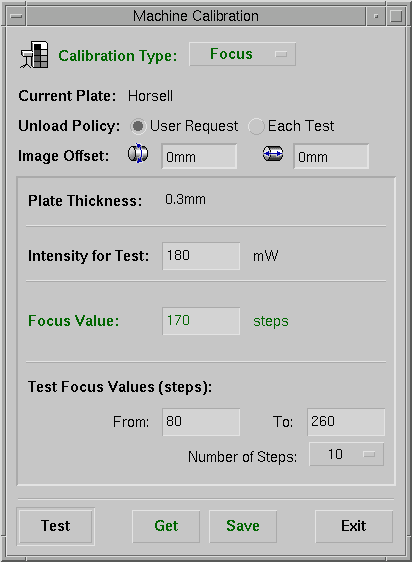
Choose Focus from the Calibration Type menu.
Figure 5-1: Lotem Calibration window - Focus test
The Current Plate type is automatically read from the
PC Controller.
Unload policy:
choose User request if you do not want the plate to
automatically unload when the test is finished. This enables you to reuse the plate for
additional calibration tests.
choose Each test if you want the plate to
automatically unload when the test is finished. In this case, you will need to load
another plate for additional tests.
Image Offset: when the plate is used for several
tests, you need to enter the position on the plate from which the current test is to
begin. Enter the vertical and horizontal offset, in mm, from the upper left corner
of the plate.
Plate thickness is automatically loaded from the PC
controller, according to the plate currently loaded.
Intensity for test: enter the laser intensity to be
used in the test. Recommended: 40% lower than the listed default value.
Focus value: the value listed is a default value or
the last saved value.
Test focus values (steps): enter the desired test
range for the stepper motor values. Recommended: enter a range of 100 - 300 motor steps.
Number of steps: enter the requested number of
exposures in the above range of Test focus values. Minimum one step is 20.
Press Test to initiate the focus test according to
the above setting.
Note: Press Get to load a previous focus test
result from the PC controller.
The application performs several exposures, according to the
settings in the above window.
When the exposure is completed, develop the plate and
examine the results.
In the exposed batch, select the rectangle of the highest
intensity. This rectangle is the lightest or darkest rectangle, depending on the plate
type.
Mark the focus stepper motor value of the selected
rectangle. This value is the optimal focus for the tested plate thickness.
Enter the above optimal focus value in the Focus value
field of the Focuscalibration window.
Press Save to save the new focus stepper motor value
in the PC controller.
If required, repeat the test for other plate types and plate
thickness values.
Press Exit to exit from this window, or continue to
another calibration test.
Copyright
(c)1998 Scitex Corporation Ltd. All rights reserved. Certain names, logos,
designs, titles, words or phrases on this page may constitute trademarks, servicemarks,
or tradenames of CreoScitex Corporation Ltd. or other entities which may be
registered in certain jurisdictions.