Home | Contact Us | Submit Troubleshooting Info | Search | Help


    Output | Software Solutions | Proofing | Color, Screening and Calibration | Scanning | Digital Photography | Consumables | POS


Alignment pin half web adjustment


Product

 
  • Lotem® 800 Family
  • Lotem 800 Quantum
  • Lotem 800 with Spectrum
  • Lotem 800 Quantum with Spectrum
  • Lotem 850 Quantum

Background


The alignment pin half web was revised to make adjusting the alignment pin easier.
To adjust the previous version of the alignment pin, you had to move the spring spoiler.
The revised alignment pin is separate from the spring spoiler, enabling you to adjust the alignment pin without moving the spring spoiler.


Requirements


Half web alignment pin jig (p/n 291A9B155)


Procedure

  Perform this procedure on both of the two center spring spoilers, at the same time.
  1. From within Lotem Controller, open the rear door and then shut down the platesetter.
  2. Disconnect the main power cable.
  3. Access the spring rollers.
  4. Loosen the two Allen screws in the alignment pin half web.
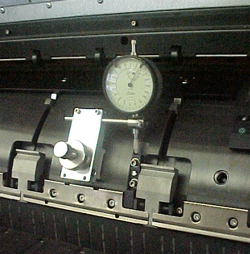
  5. Assemble the half web alignment pin jig on the drum as shown below.
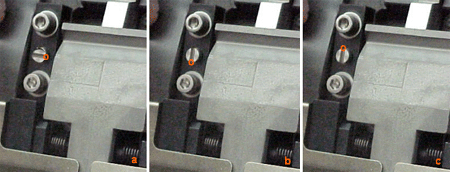
  6. Starting with the eccentric pin in a horizontal position as shown below (a), turn the eccentric pin 90° clockwise (b), and then 180° counter-clockwise (c)—(0.5 mm). As you turn the eccentric pin, the alignment pin version 2 moves slightly.
  7. When the alignment pin version 2 is properly positioned, tighten the two Allen screws.


See also


Technical contact(s)
 

Content owner: Iris Mordan
See the Escalation page for escalation contacts.

Date submitted
 

12 Sep 2002


    Copyright © 2005 Creo Inc. All rights reserved. Confidential. Back to top.

Popups / Tool Tips for this Page

   Close this popup...

  1. From the Lotem application, open the rear door, and then shutdown the machine.

  2. Disconnect the main power cable.