Home | Contact Us | Submit Troubleshooting Info | Search | Help


    Output | Software Solutions | Proofing | Color, Screening and Calibration | Scanning | Digital Photography | Consumables | POS


Replacing the long cleaning brush with a short cleaning brush


Product

 
  • Lotem 800
  • Lotem® 800 VL

Background


In situations in which high-ablation plates are regularly used, plate ablation accumulates on both the optic head lens protector and the light detector lens.
This causes a noticeable decline in image quality, puts a strain on the laser diodes and may ultimately cause diode failure.

This procedure provides a solution for Lotem 800 platesetters equipped with a long lens. It adds a short cleaning brush to the light detector hood.
Each time the carriage moves to the home position, the optic lens protector passes over the brush and any ablation (or other debris) that has settled on the lens protector is brushed off.
The brush prevents a buildup of debris on the lens protector, helps to maintain image quality and keeps the diodes in good working order.


Requirements

 
Part name Quantity Part number
Brush assembly 1 500-00745A
Short brush 1 252-03499A


Procedure

 
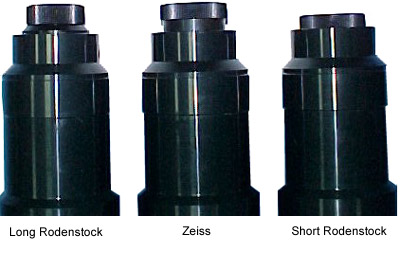
  1. Visually check the type of lens installed on the platesetter:


    Each lens requires a different length brush:

    Lens Type Brush Type
    Long Rodenstock / Zeiss Short
    Short Rodenstock Long

    Important: If the platesetter has a short lens, see the following procedures:
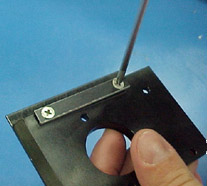
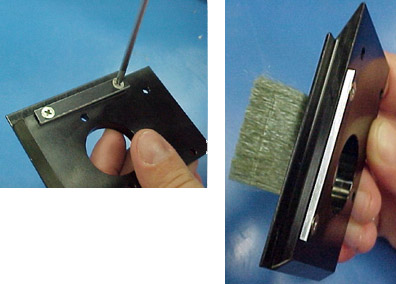
  2. Use a Philips® screwdriver to remove the two screws on the top of the brush assembly (p/n 500-00745A) and then remove the clamp:


  3. Remove the long brush from the brush assembly.
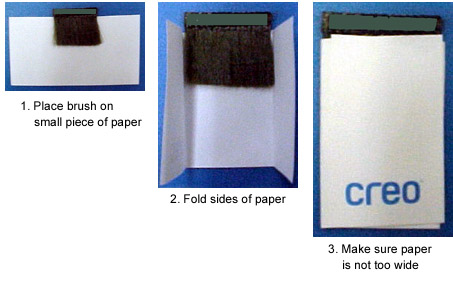
  4. Wrap the short brush (p/n 252-03499A) in a small piece of paper:


    Make sure the width of the paper fits into the slot on the hood.

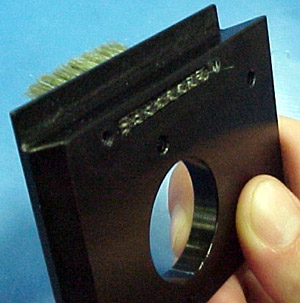
  5. Thread the brush through the slot in the hood until just the top of the brush is protruding:


  6. Remove the piece of paper wrapped around the brush.
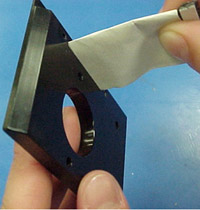
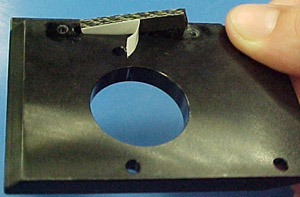
  7. Remove the tape at the top of the brush:


  8. Gently thread the remainder of the brush through the slot. Make sure the top of the brush is flush with the top of the hood:


  9. Place the clamp over the slot on the hood. Secure the clamp with two Philips screws coated in Loctite 242:


  10. Install the brush assembly onto the platesetter as described in the following procedures:
    Lotem 800:FCO #510F28458
    Lotem 800 VL: FCO #512-28458

See also


Lotem 800: FCO #510F28458
Lotem VL: FCO #512-28458


Technical contact(s)
 

Content owner: Yaron Shifman
See the Escalation page for escalation contacts.

Date submitted
 

30 Oct 2003


    Copyright © 2005 Creo Inc. All rights reserved. Confidential. Back to top.