Home | Contact Us | Submit Troubleshooting Info | Search | Help


    Output | Software Solutions | Proofing | Color, Screening and Calibration | Scanning | Digital Photography | Consumables | POS


Replacing the loading platform optical sensors on the Magnus 800 platesetter


Product


Magnus 800 platesetter


Background


This procedure describes how to remove and replace the loading platform optical sensors.
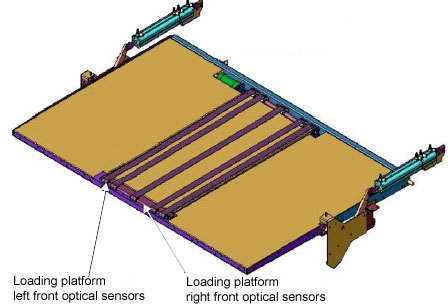
There are two optical sensors on the loading platform:

  • Loading platform left front optical sensor
  • Loading platform right front optical sensor

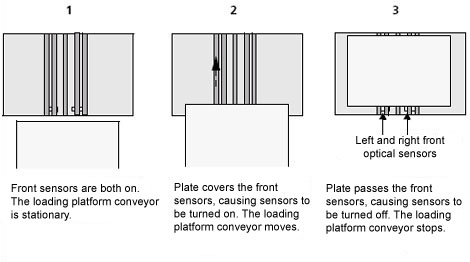
  • When the Loading platform left front optical sensor and the Loading platform right front optical sensor are on, the loading platform conveyor belts rotate and pull the plate into the platesetter.
  • When the optical sensors are off, the conveyor belts stops:


Procedure


Removing the loading platform optical sensors

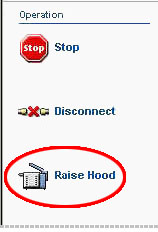
  1. In Magnus Controller click Raise Hood to raise the platesetter hood:


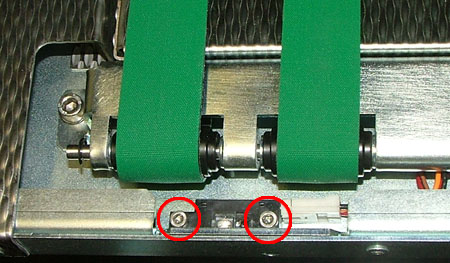
  2. Use a 3-mm hex key to remove the two screws securing the optical sensor to the loading platform:


  3. Disconnect the connector leading from the optical sensor to the loading platform.

Replacing the loading platform optical sensor

  1. The optical sensor is secured to the platesetter with two screws.
    Use a 3-mm hex key to install the two screws.
  2. Connect the optical sensor connector to its associated connector on the loading platform.

Technical contact(s)
 

Content owner: Itai Peperovich
See the Escalation page for escalation contacts.

Date submitted
 

11 Jan 2005


    Copyright © 2005 Creo Inc. All rights reserved. Confidential. Back to top.