Home | Contact Us | Submit Troubleshooting Info | Search | Help


    Output | Software Solutions | Proofing | Color, Screening and Calibration | Scanning | Digital Photography | Consumables | POS


Cleaning the unloading platform exit rollers on Magnus 800


Product


Magnus® 800


Background


There are two unloading platform exit rollers—an upper roller and a lower roller.
The upper roller touches the emulsion side of the plate, whereas the lower roller touches the aluminum side of the plate.

This procedure describes how to clean the unloading platform exit rollers on Magnus 800.


Procedure


Cleaning the unloading platform exit rollers

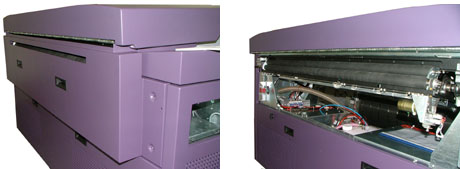
  1. Remove the platesetter’s upper rear panel:


  2. Opening the left side door of the Magnus 800
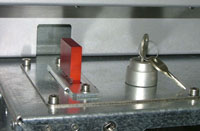
  3. Insert the bypass key into the bypass switch:


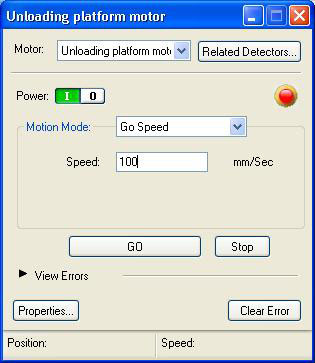
  4. In Magnus Controller, activate the motor:
    • Locate the Unloading platform motor dialog box.
    • From the Motion Mode menu, select Go Speed.
    • In the Speed box, type 100.
    • Click GO.


  5. Dampen a clean cloth in water.
    Important: Never clean the exit rollers with an alcohol based cleaner.
  6. Wipe the cloth along the length of the rotating exit rollers.
    Make sure there is no residue left on the exit rollers.
  7. When the exit rollers are clean, click Stop in the Unloading platform motor dialog box. The exit rollers will stop rotating.
  8. Remove the bypass key from the bypass switch.
  9. Reinstall the upper rear panel.
  10. Close the left side door of the platesetter.

Technical contact(s)
 

Content owner: Itai Peperovich
See the Escalation page for escalation contacts.

Date submitted
 

17 Feb 2005


    Copyright © 2005 Creo Inc. All rights reserved. Confidential. Back to top.